Answering Questions About iPads In Burlington

English: iPad with on display keyboard
English: iPad with on display keyboard (Photo credit: Wikipedia)

We have gotten a lot of inquiries about iPads in Burlington since deploying over 1,000 iPads at our high school in the fall of 2011. As we continue plans for a February deployment at our Middle School and work with pilots at our elementary schools it is interesting to reflect on the questions that we get from other schools and how some of our answers/solutions to issues change over time.  In addition, it is important to note that our answer to a particular question may not be the best answer for another school or district. 


The most important point in all of this is that educators and students in environments that allow the use of digital resources have the ability to connect and share best practices.  This culture of sharing is both valuable and fulfilling, and the best part is that immersing yourself in it can help everyone become more successful. 

Anyway, here is a list of questions I got this week in an e-mail from a fellow administrator in another district. I thought I would share the questions and answers here in the hopes that others could benefit from the responses and expand on them.

1)      What are the iPad’s used for?

It varies from one classroom to the next. In some classrooms they use them for note-taking, word processing, and web searches. Our Foreign Language Department has been able to do away with their former language lab due to the fact that the teachers now feel like they have a language lab in every classroom. 

2)       How many iPad’s are used for how many students?

We have one iPad for each student at the high school (just over 1,000 total). We will be 1:1 at the middle school in February (800 more students). We also have one first grade classroom at each of the elementary schools in a pilot and a fifth grade classroom at Pine Glen in a pilot. 

3)      Are the iPad’s used for administrative purposes? If so what? 

Administrators utilize the iPads to access our student management system and we plan on using them extensively when we implement the new evaluation system next year. 

4)      If apps are used, what subjects use the apps and what apps are the most educationally sound?

We use too many apps to list here and allow high school students to personalize their iPads by adding their own apps and having their music accessible. In regards to “foundation apps,” we promote the use of Evernote, Dropbox, Explain Everything, Google Drive, Notability. You can check out a number of reviews by our IT Staff and our Student Help Desk on these two websites: bpsedtech.org and bhshelpdesk.com.

5)      If the iPad’s are used for textbooks what textbooks fi the iPad the best? How are books put on the iPad? How are iPad’s with textbooks distributed the second year (when books are loaded)? 

We do not use the iPads for textbooks. We are in the process of pulling together our own on-line resources, utilizing a company called Net Texts.  At this point, we  feel strongly about not purchasing traditional textbooks or buying e-versions of textbooks from the textbooks companies. We would prefer to support our teachers in the curation of content that they can more readily revise each year.

6)      Do students/administrators type on the iPad? How are documents printed from the iPad’s?

There have been no significant problems typing on the iPad. We did not provide cases for all of the iPads, but instead got a neoprene which was donated by the Burlington Chamber of Commerce with some ads from local businesses. Some students chose to get cases that included a bluetooth keyboard while some choose to touch type right on the iPad. Another group uses the voice-to-text to dictate the rough drafts into the iPads and then makes the changes from there.

7)      What are the biggest positives from a student learning/administrative  point of view? 

One of the biggest positives has been the fact that staff has had to rely on students in many cases to help them learn how to use the iPads and some of the resources we now have access to. I believe that it has helped us become less of a teacher-centered school and more of a learner-centered school where we are all learners together.

8)      What are the biggest negatives? 

I think the concerns are that we address misuse of digital resources and have conversations about balance. We are not promoting an “all iPad, all the time” environment. Thoughtful lesson-planning means integrating appropriate resources whether they are technology-based or not. 

Questions about How the iPad’s Are Deployed

9)      Do the iPad uses depend on regular wireless access? How much of the building/school system is wireless? 

We have wireless throughout all of our school buildings.  There are certainly ways to utilize the iPads without wireless access, but I think the infrastructure of a school or district should be upgraded before the integration of wireless devices.

10)   Are the iPad’s bought or leased? 

We pay for our iPads through a three-year lease to own program. 

11)   Who handles iPad repairs? How are the iPad’s re-charged? 

We have a student help desk which is the front line of handling iPad issues. They are supported by staff who can step in and resolve issues that they cannot.  However, the issues that the schools are unable to resolve are very few. In regards to charging, students recharge the iPads at home after school. Because the iPads are not used every minute of every day, they can go multiple days without being recharged.  Charging of devices has been a non-issue.

12)   What training was done for technology staff? For teachers? 

We spent a great deal of time leading up to the deployment sharing digital resources with staff and offering numerous sessions on resources that we thought that they would find most useful. We have given staff a great deal of time to get together informally as well to share what is working and what is not. Again, having the help desk available throughout the school day allows staff and students to get questions answered and learn about resources in which they are interested.

13)   Are the iPad’s networked in any way? What hardware/software is used in networking? 

All of our iPads access our school network. We currently use a browser from Lightspeed Systems that ensures that the student iPads go through our server and our filtering whether they are in or out of school.

14)   How is software loaded on the iPad’s? How is the software purchased? 

At the high school level, most of the apps utilized are free apps that students load themselves.  At the middle and elementary levels the apps are loaded by the IT staff via a synching cart. Pay for apps that are bought by the school are done through the volume purchasing program.

Enhanced by Zemanta

Answering A Few Questions From My Sessions At AASSP/AAMSP Fall Conference


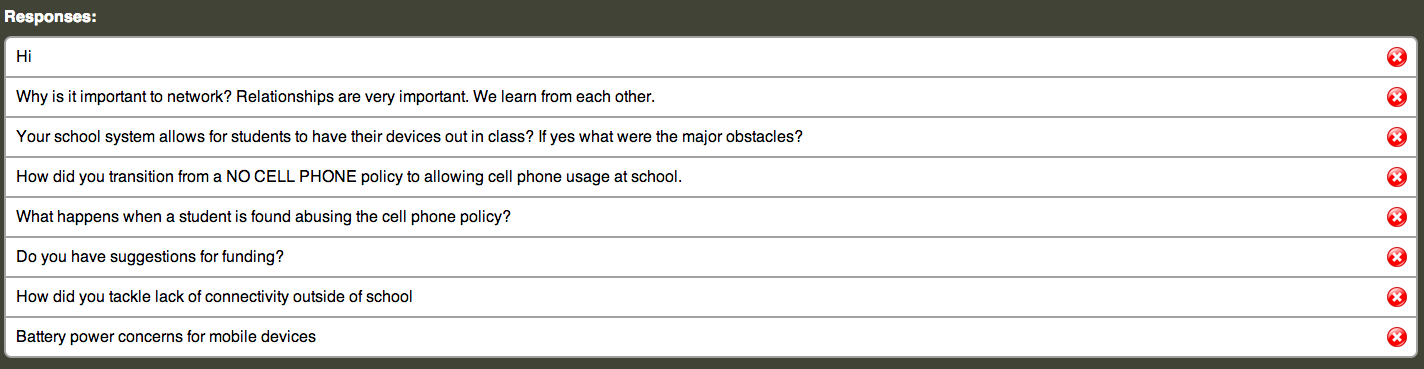
I was fortunate to have the opportunity to provide a keynote and a breakout session at the AASSP/AAMSP Fall Conference which was organized by Council for Leaders in Alabama Schools in Orange Beach, Alabama this week. The two sessions were titled – Leading in a Learner-Centered Environment and Transparent Leadership. During each of the sessions, I used Socrative and allowed audience members to ask questions using the short answer option from Socrative. (See the responses below).

At the end of the sessions we had a chance to answer a few of the questions, but there were a few that we did not get to discuss. Since the list is relatively short, I will respond to all of the questions below.

 At the end of the sessions we had a chance to answer a few of the questions, but there were a few that we did not get to discuss. Since the list is relatively short, I will respond to all of the questions below.

Why is it important to network? 

The question above was a key focus of the session on Transparent Leadership as we discussed not only why it is important to network, but how to use digital resources to expand our networks beyond what we were capable of in the past.  Who you know and who you can learn from has always been an important factor for individuals.  It is imperative that school leaders are modeling the use of the most current resources to show all of the learners in their communities how they build their network to collaborate and learn with/from others. 

 If your school allows students to bring their own devices, what are the major obstacles?

We provide the devices for students here in Burlington where all of the students have iPads.  There is a lot of information out there about BYOD programs. Here is an article that Peter DeWitt wrote for Education Week back in August. I have also saved a number of articles on BYOD in my Diigo bookmarks

 How do you transition from NO CELLPHONE POLICY to allowing cellphones in School?

Here’s a link to a blog post that I wrote back in 2009 when we started to discuss the change in our policy. The bottom line for me is that we need to provide more resources to our classroom teachers and not take away access to resources that they want to utilize in their classrooms. Our change in the handbook the next year went from “no cellphones” to “cellphones may be used at the discretion of the classroom teacher.” Due to the smooth nature of the transition, we opened it up the following year to cellphone use in the cafeteria and in the halls between classes. 

 What happens when a student is found abusing the cellphone policy?

The protocol is pretty similar to most situations where students are not compliant with school regulations. The first offense is a warning along with a discussion to find out what necessitated the use of the cellphone in a disruptive manner, the second offense and subsequent offenses call for the device to be sent to the Assistant Principal’s Office to be claimed by a parent. 

With the move to all students having iPads in the school, the use of cellphones in a disruptive manner has really been a non-issue. 

Do you have suggestions for funding?

At BHS we looked at some of the things that we had spent money on traditionally (i.e. textbooks) and decided we were going to use these funds differently. In addition, we cut way removed a number of printers and cut back on our paper consumption. While these savings did not cover the entire cost of the devices, we did get a good start in covering the cost. 

How do you tackle lack of connectivity outside of school?

In our town connectivity outside of school is not an issue.  We have a number of businesses in town that have free wifi. In addition, most people have a wireless connection at home.  For those who have a problem with this expense, Comcast offers internet access for low-income families for $9.99 a month.

 Battery power concerns for mobile devices?

Battery life was definitely a concern for us at BHS, especially when we considered the fact that the electrical infrastructure in our 40-year old building would not easily support 1,000 mobile devices being plugged in daily. Fortunately, the iPad solved this issue with its battery-life lasting multiple days for most students.


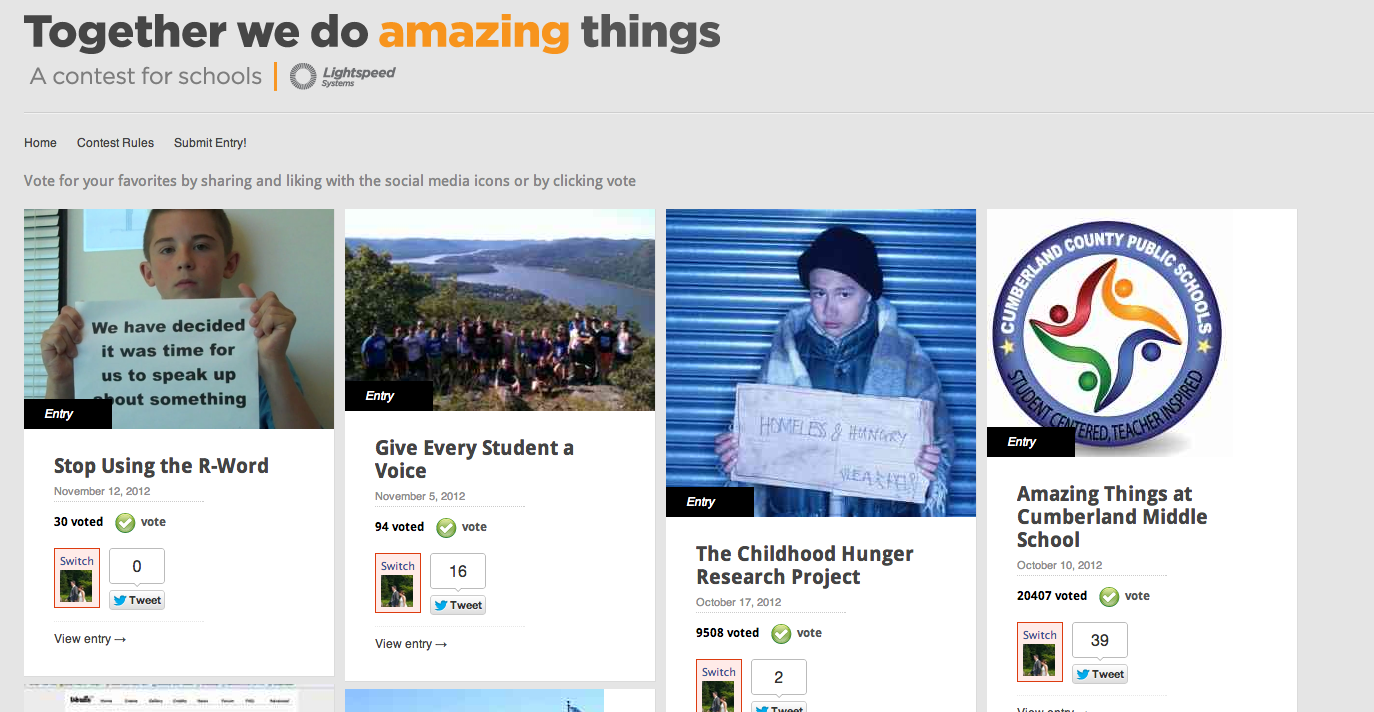
Please Vote For Our Seventh Graders Who Made PSA

Our Marshall Simonds Middle School seventh graders who made a Public Service Announcement on the use of the R-word have been entered into a contest sponsored by Lightspeed Systems.  The winner of the “Together we do amazing things” contest will win $1,000 for their school.  Please take a moment to vote for our students here. 

If you missed the video when it was initially posted last month, please check it out by clicking on the link below.

Related articles

Enhanced by Zemanta

Edutopia Blog Highlights Work of BPS First Grade Teachers

A blog post by Andy Marcinek went up on Edutopia’s Site this week highlighting the efforts two Burlington Public Schools First Grade teachers have made this year to integrate technology into their classrooms. The two teachers, Irene Farmer from Francis Wyman and Erin Guanci from Pine Glen, are part of our first grade iPad pilot and they shared their insights from the first few months of the school year with Edutopia.


cc licensed ( BY ) flickr photo shared by flickingerbrad

From the Edutopia Post 

In my last two posts, I detailed the iPad initiatives at Burlington High School. I talked about what we learned after a year of a 1:1 iPad environment and dispelled some myths surrounding iPads in education. Recently, I had the opportunity to connect with two of my elementary teachers at Pine Glen Elementary and Francis Wyman Elementary schools. This year, four first grade classrooms will be piloting a 1:1 iPad environment. The iPads stay in the classroom and are only used during class time. Two of the teachers involved, Irene Farmer and Erin Guanci, sat down with me and answered a few questions about their expectations of the initiative, how they are using the device at the moment, and how they feel it will work in an elementary classroom.

Read the rest of the post here

Enhanced by Zemanta