
-
Check out @jlscheffer #padlet on the question What is causing the gender gap in #STEM ? http://t.co/cPBRq84Hxz #educon
-
A report on the current state of affairs and how we are hurting kids by pushing too much too soon.
-
An interesting conversation from Educon about reframing professional learning for twachers.
-
MT @patrickmlarkin: The Quest for an AA Degree in #HighSchool http://t.co/xwaIC6PTfu @Getting_Smart #echs
-
If your company is about to transition to Google Apps, there will undoubtedly be some strong resistance. It’s a matter of human nature – people don’t tend to embrace change. We like things the way they are. This is why your company needs a strategic plan for dealing with change management when you begin to implement Google Apps.
-
From Richard Byrne – There are plenty of good places to find free ebooks online, here’s another worth taking a look at. Forgotten Books republishes thousands of classic works that are in the public domain. Forgotten Books offers all of their titles as free PDF downloads and provides links to ePub versions of the titles.
-
From Richard Byrne – “Google Earth and Google Maps has always been a natural fit in social studies classrooms. But Google Earth and Maps can also be powerful tools in other content areas. The resources below represent some of my favorite resources for introducing Google Earth and Maps in areas outside of social studies.”
-
From Larry Cuban “claims from technological enthusiasts that “progress” means classroom teachers will be obsolete in the 21st century are, at best, premature, or, at worst, mindless.”
-
On selecting devices – One District’s Search for the Next-Gen Device – Part III – See more at: http://t.co/z52OGeEBPb #1to1techat #byotchat
-
MT: @GetKahoot Brand new features: Google Drive Export, Cheating Prevention & more http://t.co/9xRJuInhLV #bpschat #1to1ipadchat #edtech
-
From Justin Tarte – Over the last two years there has been quite a lot of work done in my district in regard to grading beliefs and grading practices. As a result, our HS has recently agreed upon these 4 beliefs on grading.
Author: Patrick Larkin
I have been in school leadership for over 25 years. I feel blessed to be an educator. I have had the good fortune of working as an English teacher, an Assistant Principal, a Principal, and an Assistant Superintendent in three districts in MA. I am also proud to be an IDEAS Instructor working with educators across the state and region who are part of schools and communities that promote anti-bias, anti-racist education.
Going 1:1? Put Students In A Position To Lead!
I was asked by BHS Senior Cat Hoyt to write an endorsement for our Burlington High School Student Help Desk for the Follett Challenge, a contest for which she made the video below. I thought the endorsement was worth sharing with others who also might want to start a Student Help Desk. Whether you are 1:1 or not, this would be a great resource for your school!
Burlington High School became a 1:1 high school distributing iPads to all students and staff at the beginning of the 2011-2012 school year. As someone who speaks regularly to teachers and administrator from other schools about this initiative, I can say without hesitation that the biggest factor in the success of this program has been the involvement of our students through the BHS Help Desk.
In the fall of 2011, I dealt with a great deal of anxiety as we distributed over 1,100 iPads and became one of the first schools in the country to become a 1:1 iPad school. I was worried that the program would be a flop and that teachers and students would struggle to integrate these new digital devices into their daily workflows. However, the BHS Help Desk released me from my fears by giving staff and students a place to go and find answers and solutions to each and every question that came up regarding their iPads or one of the endless web-based resources that they could now access through their new device.

Our students solved the biggest question for us that administrators are faced with during the implementation of any initiative – where do I go if I need help? There was not anyone in our district who could claim that they did not have a place to turn if they ran into a problem. In addition, the response from faculty and students about the quality of the feedback from our student help desk team has been overwhelmingly positive. It is quite common to swing by the help desk and see staff members being taught by students. We have also had a number of teachers who have had student help desk support in their classrooms as they tried using a new digital tool for the first time. The whole experience has been transformative as we have broken down traditional boundaries that separate teachers and students and become a community of learners where adults are just as comfortable being on the receiving end of the learning as they are facilitating it.
Finally, I could not have a discussion about the BHS Student Help Desk without talking about the amazing BHS Help Desk website which can be seen at BHSHelpdesk.com. This site has been an incredible resource for learners inside of Burlington and outside who are looking to increase their capacity to use iPads and/or other digital resources. As someone who connects with those in other school communities, I have had numerous discussions with educators from all over the country who have referenced our student help desk as a valuable resource for their own learning. Our students are constantly investigating and sharing insights on the latest and greatest resources for students and teachers.


So, the first step for any school looking to increase its technological capacities is undoubtedly to start a student help desk. When students take the lead good things happen. The BHS Student Help Desk is living proof!
Do You Have Three Minutes To Learn Something New? – Burlington Blog Update (Edition 16)
The post below is actually a copy of a weekly e-mail that I send to our staff to promote our Burlington Public Schools Blog which shares the great work going on across our school district. I also try to give a quick technology tip/resource that I think would be useful. It is the 16th post in the series.
Do You Have Three Minutes To Spare?
I know how thin educators are stretched in regards to their free time. However, I also know there some great tools out there that can be integrated with very little background knowledge. Thankfully, Craig Badura has started his “Learn it 3 With Me” Series to help busy educators learn about some of these resources.
His first three-minute video (embedded below) highlights Kahoot, a classroom response game that students love. Some BPS Staff are already using Kahoot, so take three minutes and join them.
Another PD Opportunity to Increase Your Google Skills
Cambridge Public Schools is hosting Googlepalooza on February 19 which is the Thursday of vacation week. Here is the link to the site for more information. Please e-mail Rosemary if you would like to attend and we will cover the cost.
Burlington Blog Update
- Day 80 – “Help Desk is Not a Real World Simulation, Help Desk is the Real World” – Cat Hoyt – BHS Senior
- Day 81 – What’s The Matter? – Sarah Visocchi – Pine Glen 4th Grad
- Day 82 – Celebrating Friendship – Ms. Conceison – Memorial School Fifth Grade
- Day 83 – Engaging Learners Beyond the Screen with Osmo – TJ Horgan – BHS Senior
- Day 84 – Another Inspiring Artist Alumni Day – George Ratkevich – BPS Fine Arts Coordinator
- Bonus Post – Thank You, Dr. Martin Luther King, Jr. – Ms. Varrell – Pine Glen Second Grade
- Day 85 – NFL Super Bowl Logo Designs – Ms. Phillips – MSMS Art Department
My Weekly Diigo Bookmarks (January 18, 2015)
-
Pin by Starr Sackstein on technology | Pinterest
How Twitter in the Classroom Connects Your Students http://t.co/K9pxr7REkX
-
Coalition to Support Grieving Students
Great site to support students dealing with loss
-
Meet the Techie Ladies of BHS! | Burlington High School Help Desk
Love this video created by @jlscheffer and her female students who are leading the charge in tech! http://t.co/qzylkt4avm #edtech
-
Reagan students excited to receive laptops for school and home use | News Blog
thoughtful 1:1 rollout in @HoustonISD http://t.co/FLJ8e5bgOz Looking frwd to visiting HISD schools today!
-
Why You Should Play on Your Strengths–Not Focus on Your Weaknesses via @LollyDaskal http://t.co/4Uzm7nPTIU http://t.co/ysXqtwssCi
-
Book-Writing Productivity Hacks – Business Insider
The Productivity Hacks I Used To Write A 93,000-Word Book In 6 Weeks – thought you would like this @thenerdyteacher http://t.co/6hGrpyijyO
-
From Read Write Think
-
Separate People From Their Phones, And They Perform Less Well | Smart News | Smithsonian
“a new study suggests that being separated from your phone can have serious psychological and physiological effects. As smartphones become even more ubiquitous—as of 2014, 58 percent of all adult American cell phone owners had one—there’s been plenty of backlash against constant connectivity. But don’t put down that phone just yet—a new study suggests that being separated from your phone can have serious psychological and physiological effects. Read more: http://www.smithsonianmag.com/smart-news/putting-down-phone-can-make-you-dumber-180953873/#dmrj3AkHD8dFxT0Y.99 Give the gift of Smithsonian magazine for only $12! http://bit.ly/1cGUiGv Follow us: @SmithsonianMag on Twitter
-
Performance Goes Down When People are Separated from Their iPhones | Big Think
Our findings suggest that iPhone separation can negatively impact performance on mental tasks. Additionally, the results from our study suggest that iPhones are capable of becoming an extension of our selves such that when separated, we experience a lessening of ‘self’ and a negative physiological state.”
-
Explore the World with the Google Cultural Institute
From Jen Carey – “I am a big fan of the Google Cultural Institute; it’s an amazing repository of Artistic Masterpieces, Wonders of the Natural World, Historical Artifacts, and more. By using it as a repository of digital materials, it’s an easy way to access cultural content from around the world in my classroom. I can pull up a high definition image of Van Gogh’s Starry Night and use its powerful zoom features so that students can see the impasto brush strokes. We can explore the Street Art of Sao Paulo with a Google Street View for a unit on modern art or the Ruins at Angkor Wat when covering a unit on Ancient History.”
-
Good thoughts on failure from Cathy Davidson
-
History in Motion – Create Multimedia History Stories
From Richard Byrne – “History in Motion is a promising service that allows teachers and students to build multimedia history stories. On History in Motion you can build animated timelines that can move in conjunction with movements on a map. At each stop along your timeline and map you can include descriptions of events, display images, and display videos.”
-
Another site for free online textbooks
-
A site for free online textbooks
-
Google for Education: Bringing Learning Online
Google’s Guide to Online education
Getting Ready To Go 1:1 FAQ’s

As a school district that has implemented a 1:1 initiative where every student is provided an iPad, we get frequent inquiries from other communities looking to begin similar programs. Back in 2011-2012 school year as our 1:1 Planning Team began the process of setting the stage for year one of this initiative, we had more questions than answers. Interestingly, each school district that we speak with regarding our 1:1 journey has many of the same questions. With this in mind, I thought it would be worthwhile to share some of these common questions and our responses to them.
However, before answering these questions, it needs to be noted that there is no one right answer to many of these questions. These questions need to be answered by the stakeholders in your community because the final solution for our schools is not necessarily the final solution for another school or district. In addition, some of these questions will need to be revisited given the ever-changing nature of technology. Finally, I am sure that I missed a lot of questions so feel free to drop new questions or follow-ups in the comment section.
What type of equipment do you recommend? (laptop? iPad with a keyboard?)
In regards to the final device choice, I would suggest something that meets the needs of all learners and can support your instructional goals. While you will never be able to choose one device that would be the first choice for everyone, you will be able to choose a device that will allow everyone to get their work done. Your technology of choice should be integrated to support your current objectives.

How do you control students getting distracted by all the websites they love to visit while they are avoiding the work at hand?
This is an important conversation that should be had frequently in the early months of 1:1 within and across departments. The more we discuss this, the clearer it becomes is that the best way for teachers to monitor student activities in their classrooms has not changed due to the arrival of more devices in the hands of students. The key is for staff to be active moving around the classroom and use what one colleague calls “the two legs app.” Students have always been distracted and always will, but we need to talk about classroom best practices that can help us in minimizing these distractions.
Do you find that students are more excited about learning?
We have seen an increase in the levels of classroom engagement, but this is more do to changes in instructional practices than the addition of technology to the classrooms. Even prior to the arrival of the iPads in our district, we had started Learning Walks to look at the level of student engagement in our classroom. We have found that the level of engagement is higher due to the numerous digital resources that are available to staff and students which allow a greater variety of methods for students to show their learning.
What are some examples of collaboration you have seen happening in your district that otherwise would not have happened without the 1:1 technology?
Some of the examples of technological resources that have helped us increase collaboration between staff and our stakeholders are our district blogs which have grown to over 100 across the districts. Knowing that their students all have web-enabled devices in their hands, teachers have taken advantage of using online spaces such as blogs and web pages to post assignments, videos, and other instructional resources.
In addition, we have numerous social media accounts at both the school and district level which allow opportunities for collaboration. Our use of Google apps, particularly Google Drive and Google Docs has created an increase in collaborative writing and collaboration in general due to the ability of staff and students to connect both synchronously and asynchronously to complete tasks.
Do you have a fee/rental fee/lease fee/pay to own for the use of the technology?
We do not have a fee, but we do have students and parents sign a responsibility form and we recommend insurance.
Do they own the iPad/laptop when they are finished with high school?
Upon graduation, students have the option of purchasing the iPad. The vast majority of our students take their iPads with them.
What happens if a computer is damaged/breaks? If it is the students fault are they responsible for paying the replacement cost of the laptop/iPad?
Insurance covers loss, theft, and damage to the iPads, but if a family does not have the insurance then they need to cover the cost of the repair or replacement.
Do the students bring the laptop/iPad home with them for use at home?
Students at the high school bring their devices home and we are looking at a plan for students at other levels to bring their devices home as well. The use of tools like Google Apps for education allows students to access their work on any device to which they have access which minimizes the impact of students across the district who only have access to iPads in school.
Do the parents/guardians sign an agreement policy for the use of the iPad/Laptop?
Yes
Does the technology department keep the computer/iPad over the summer months to clean the computer and download new software?
High school students are allowed to bring their devices home during the summer while iPads in grades K-8 are kept at school.
Did your district start with all student getting the technology or did the district start with a certain grade level?
The 1:1 initiative began at the high school in 2011-2012 and expanded to the middle school in 20012-2013. In addition, we began a pilot in a single classroom in grades 1, 4, and 5 at each of our four elementary schools in 20012-2013. The teachers for these pilots were chosen due to their high-level of interest in Started at the high school. Then we went to the Middle School and had pilots in the elementary.
How did you fund your 1:1 plan? School budget, capital expense, grants, donations?
We have funded our plan through the school budget. Two things helped us obtain the funds that we needed to begin and sustain this initiative. First was a commitment from our school board and town to agree to have a regular line item for technology purchases in our school budget. Our superintendent made the argument that technology needs (both infrastructure and equipment) need to be looked at as a utility that is purchased annually. We spend over $1,000,000 annually on electricity in our district and no one flinches. In our current day and age, we need to also understand that technology will be a regular expense in order to provide the resources our students and staff need to ensure that they are being prepared for the “real world.”
When you went 1:1, did you simultaneously make any changes to your textbook purchases, in terms of electronic subscriptions or plans? How did those changes affect your budgeting (i.e. how much did it add per device purchased)? If your rollout was one grade per year, how did you handle textbook changes for cross-grade courses?
When we went 1:1, we made a commitment to not buying any new sets of textbooks and instead commit time for teacher to build own resources. The process of staff developing their own resources continues to be an ongoing process. With the growing number of Open Educational Resources available as well as tools for teachers (and students) to create their own “books” to move beyond the traditional textbook, time and training are the only hurdles that need to be cleared.
Were there any bulk purchases for e-books for the school library with the 1:1 initiative? If so, how were they funded?
There were not any bulk purchases for e-books made. We continue to buy a generous amount of books for the libraries in our district. In addition, we have tried to add to our digital collection as well for students who prefer to do their reading digitally. Our goal is to continue to offer a balanced collection to meet the varied preferences of staff and students
What was your planning and timeframe for professional development with the 1:1 plan?
We spent a year ahead looking at digital resources that could help add value for teachers and students. This type of PD has been ongoing and embedded with the support of building and district-wide Instructional Technology support. Our Student Help Desk has also played a huge role in our ongoing learning in regards to utilizing digital tools. The BHS Help Desk provides support daily for staff and students who need help with their device or would like to know how they can use a specific digital tool to support their learning.
During the first year, we simply asked that all teachers consider using a digital space to share work with students and then provided time for teachers to share what was working best for them. Now in year four, we have added a district-wide Mobile Learning Coach to support building-based Instructional Technology Staff.
My recommendation for schools and districts who would like to move forward is to commit to spending 20-25% of what you spend on “the stuff” to Professional Development in the form of training or staff to support classroom teachers.
What additional technology infrastructure/staffing did you need for the Tech Team and the school network to successfully host/manage so many additional wireless devices?
The network was in place first. I regards to staffing, there has been no significant change to the IT Staff that handles our network and hardware issues. We did add a Director of Technology Integration and a Mobile Learning Coach.
Chromebooks, ipads or laptops, which one and why?
I would say iPads or Chromebooks from a cost and management standpoint. You can decide which makes sense for you based on the types of tasks you expect students to be completing in their daily routines. This is a conversation that needs to take place locally and with the appropriate commitment to Professional Development I do not think that there is a wrong choice.
If you would like a little background information on Chromebook vs. iPad, check out this thoughtful post on The Great Device Debate written by a couple of BHS students last year
Which grade do you begin with 9, 10, 11 or 12? Does grade 12 even make sense?
Again, what are you goals with the program? Are there grade levels where you feel the capacity of staff is stronger in regards to implementation. Starting smaller where you are confident there will be success makes the most sense. The important things is that no matter where you start your 1:1 journey, there needs to be regular updates for staff, students, and the community to share successes, challenges and plans for further expansion the program.
For more information on our journey to become a 1:1 school/district, please check out the following series of posts which were written during and after our first year of 1:1 implementation:
Becoming a 1:1 School Series
Looking Back at Year One of 1:1
For more information on our journey to become a 1:1 school/district, please check out the following series of posts which were written during and after our first year of 1:1 implementation:
Becoming a 1:1 School Series
Looking Back at Year One of 1:1
Looking Back and Looking Ahead – BPS Blog Update (Edition 15)
The post below is actually a copy of a weekly e-mail that I send to our staff to promote our Burlington Public Schools Blog which shares the great work going on across our school district. I also try to give a quick technology tip/resource that I think would be useful. It is the 15th post in the series.
With this being the first BPS Blog Update of 2015, I thought I would highlight a few statistics from the first half of the year. The BPS Blog was just short of 80,000 pageviews during the first half of the 2014-2015 school year. Here’s a quick review of the top three posts from 2014.

The students stole the spotlight with two of the top three posts during the first half of the 2014-15 school year. Seniors Kristen Johnson and Cat Hoyt had the most widely viewed posts with Francis Wyman IT Specialist Ben Schersten getting the staff on the board with his post on Chromebook shortcuts.
The one thing that is certain is that all of these posts are worth revisiting!
I Am Not A Barbie Girl – BHS Senior Kristin Johnson
3 Reasons Why Google Calendar is the Student Athlete’s Best Friend – Cat Hoyt, BHS Senior
#Chromebook Keyboard Shortcuts – Ben Schersten, Francis Wyman IT Specialist
If you are a blogger user and would like to check your stats, just follow the two steps below.
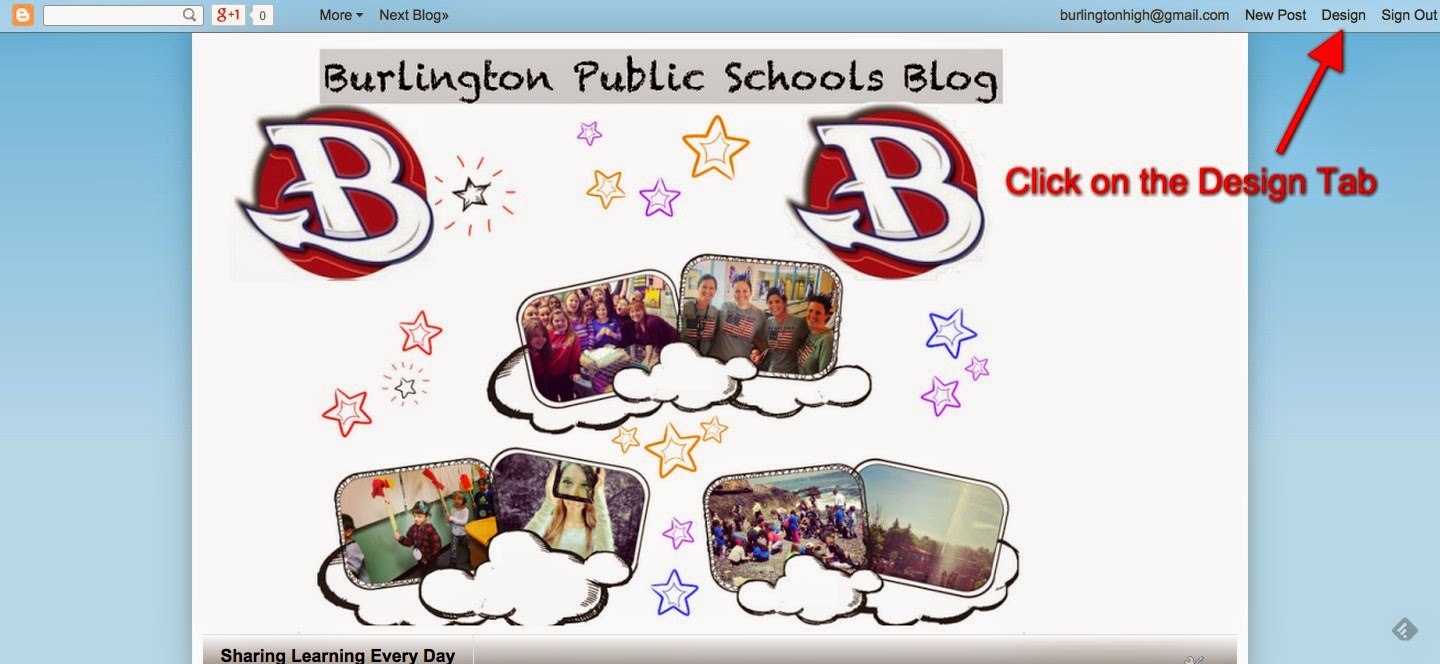
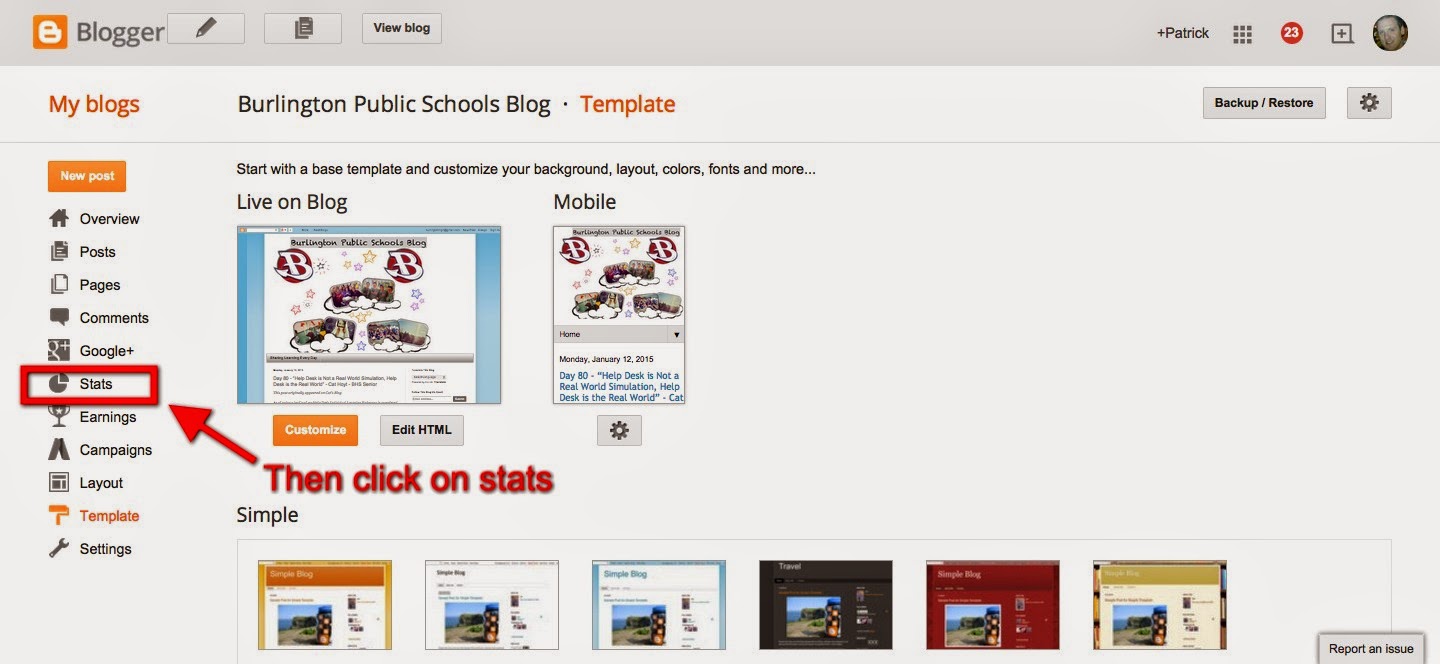
I am looking forward to seeing all of the exciting things that are shared during the remainder of the year! Here are the first five posts from 2015! As always, feel free to drop me an e-mail if there is something you would like to see highlighted on the BPS Blog!
Only 101 more posts to go…
A Great Student Reflection About Our Student Help Desk for the #FollettChallenge
This post originally appeared on the blog of BHS Senior Cat Hoyt
As of today 2/3rd’s of my Help Desk Individual Learning Endeavor is completed. I recently completed my video entry for the Follett Challenge after two months of taping, editing and re-editing and I am very proud of the results. To put it briefly, the Follett Challenge is a contest structured so that even if you do not win the contest you have broadcasted your program to the world and received global recognition. The video I have created is a promotional video for the Burlington High School Help Desk and it explains what the program is, what it does, it’s benefits to the school and district and the innovative ways in which we integrate technology. The video is embedded below.
Additionally, 5 essays were required upon submission of the video to the Follett Challenge to provide Follett with a description of the program, the objectives and outcomes of the program, the methods, strategies and action steps, a discussion of previous approaches and an endorsement statement. The essays were written by myself, Mrs. Scheffer and Mr. Larkin and links to each of them are below.
Program Description: (By Cat Hoyt)



So now that you know what the challenge is and what I have submitted, I would very greatly appreciate your vote. The winner of the Follett Challenge is picked partially based off of the reviews of judges and partially based off of the amount of votes it gets on the Follett Challenge webpage. Voting takes place between January 19th through the 30th and you can vote more than once. All I ask is one vote per day and you could be putting BHS one step closer to winning our share of $200,000 which is either $30,000 for the Grand and Semifinalist Prizes or $8,000 for a People’s Choice Video Winner. So PLEASE vote for BHS and the Help Desk every day from January 19th through the 30th!
To encourage others to vote for us spread the word! Send out tweets reminding people to vote for us or share these images to your social media sites. Thank you in advance and happy voting!


My Weekly Diigo Bookmarks (January 11, 2015)
-
Teacher Leadership Is More Complicated Than You Think http://t.co/hLPhG0AeRx
-
“current practices of our educational institutions—and workplaces—are a mismatch between the age we live in and the institutions we have built over the last 100-plus years.”
-
Interesting take from James Delisle in EdWeek
-
Easily create an eBook with these 3 powerful apps – http://t.co/gsOuyuakxO #edtech #edchat #ettipad
-
Great example of elementary classroom connecting online to empower students to do great things
-
Article in Science Magazine from Justin Reich
-
“Supporting ELLs in The Common Core Era” http://t.co/TZblngyHwD via @larryferlazzo
-
from notosh
-
From George Couros – In case you missed it @BHShelpdesk Ss @kristian1ty & @cathoyt_ had 2 of the 3 top posts 1st half of 14-15 http://t.co/UBRROsRuBW #bpschat
-
From John Seely Brown
-
Good resource from Gino Bondi
-
Another article blaming the tool instead of the behavior
-
Great talk from Annie Murphy Paul on intelligence and a Growth Mindset
-
Great literacy resources
What Do You Do When You See Inappropriate Social Media Posts By High School Students?
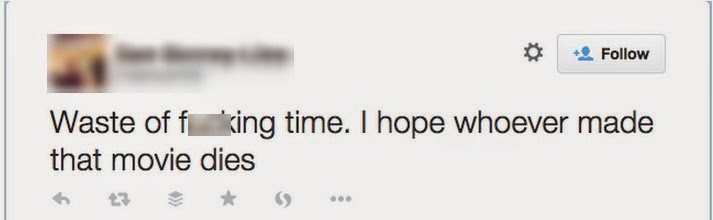
It’s no secret that I’m a huge fan of social media as a tool for learning. In order to stay on top of the various conversations that I like to follow, I have a number of lists that I have created. These various streams sometimes lead me to inappropriate posts by students. These instances concern me as to the amount of guidance that these students are being given in regards to the things that they post online and the possible ramifications.
As an educator, I feel it is the job of all of us to support students and ensure that they are fully aware of the implications of their online activities. Therefore, when I saw the tweet above from a local student-athlete, I decided to send the e-mail below to his Principal. I encourage others to take similar actions when they see this type of behavior. (I have removed the name of the student and the school because the truth of the matter is these things are happening at all of our schools).
Dear Principal Name,
I wanted to ask you to please have a conversation with Student Name about his use of Twitter. I stumbled across it while looking for some local high school basketball scores last night. While I do not think most student profanity on Twitter or other social media is a school issue, I have a concern for students who say things in this forum who may fail to understand the implications. As a former high school Principal and a current Assistant Superintendent, I am a big advocate of social media use and I continue to push for the constructive use of social media by all members of a school community.
My concern is that I do not want to see students lose out on opportunities due to comments they make on Twitter or anywhere else on social media. At one point when I was a high school Principal, I pulled all of my juniors and seniors into the auditorium and shared some of the comments that I had seen them using and talked about the ramifications with them in regards to the question on the top of the slide below. I worry that someone would make a judgement about the type of person one of our students is because of a single social media post. However, the fact of the matter is that this might be the only evidence of social interaction from that individual to which a school or employer has access and when there is a pile of other applicants it is easier to move to the next option.


In addition, The New York Times article They Loved Your G.P.A. And Then They Saw Your Tweets highlighted the fact that some college admissions offices check the activity of students Just this week, USA Today had an article titled One Bad Tweet Can Be Costly To A Student Athlete. While I know most student-athletes aren’t concerned about scholarships, they should know that employers and college admissions offices actively check social media accounts of applicants and make decisions based on what they find.
In most cases, a quick Google search by a students using their name + Twitter would quickly bring you to their account information.
I was going to tweet to Student Name directly, but I did not want to bring attention to this. I have little doubt that he is a fine representation of a student-athlete at your school and I hope he will consider cleaning up his social media accounts. While I don’t condone the use of profanity and such, I remember being a high school student and the fact that many of these same conversations and comments were common in the locker room or hanging out with friends or teammates. My concern is that now many of our students are having these conversations online without a full awareness of how public they are.
Anyway, sorry for the long e-mail. I wish you the best during the remainder of the school year and trust that this will not be a disciplinary matter but just a “teachable moment.” Good luck to Student Name and the team for the rest of the year!
My Weekly Diigo Bookmarks (January 4, 2015)
-
What Connected Educators Do Differently by @ToddWhitaker @Jeff_Zoul @casas_jimmy http://t.co/w0uUG5F71M #IAedchat #edchat
-
If we want better students, end the 19th-century ‘grading game’ via @Shareski cc @lowenESST #PSD70 http://t.co/CK0L7uCiA9
-
Found #examples beat textbook ones http://t.co/vJtldkKttJ #digital #resources #ela #engchat
-
Apps to ring in the New Year, and for the resolutions after http://t.co/7Z81N98u4z
-
The Spirit of the Lord and the Magic of Being Loved http://t.co/XqxTSs13CP via @lifeingrace
-
Is Your High School Hurting Your College Chances? http://t.co/iXv0wWOo7E
-
Education thought leaders forecast 2015 trends – @DA_magazine http://t.co/WecncxrSr1
-
Keep gaining with this tip: http://t.co/pWgwWCObtP http://t.co/FkomF6sMhI
-
5 Ways school administrators can use Google apps http://t.co/5vQEgw5Pan
-
Better, faster, stronger (and happier) — talks for your New Year’s resolutions: http://t.co/Iew7fZ7cRY
-
This is WAY better than the Facebook automatic year-end movie! https://t.co/Z47Fgx9mUj https://t.co/WBv1GNixoj
-
Social media education for high school students: How one tweet can be costly to a student-athlete http://t.co/oor7ZoktHZ @SAISnews @coach_ad
-
The 10 most clicked links I shared on Twitter in 2014: http://t.co/mHJe0EpNEg #edtechchat #edchat #teacherfriends http://t.co/Ah82bLQWVS
-
Three reasons becoming a Google Education Trainer might be a great goal for 2015: http://t.co/OluZsLeHk9 #GoogleEDU #edtech #fetc
-
A contest just for Massachusetts STEM teachers: http://t.co/jAUHx7clu6 http://t.co/4vjCuKXJ8o
-
“@Stanford Carol Dweck explains how a growth mindset can help studnts succeed http://t.co/Fc2BnJZdPF” In athletics 2! Give the grade #notyet
-
NH Sports Page Basketball Bedford vs Londonderry 12-19-14: http://t.co/MJp3TrCiPa via @YouTube
-
It’s only 2 minutes, but don’t let that fool you—this is insanely tough. http://t.co/YVlKxW5jBU http://t.co/EJeNs75oSI
-
Education Should Step Away from Apple Devices #edchatMA #ntchat #edtech #teaching http://t.co/gbSC8YgJqO
 My Un-Learning Journey