A Thoughtful Post From Principal Lyons at Pine Glen

This was posted by Pine Glen Principal John Lyons on his blog last night:

Our thoughts and prayers go out tonight to the many families in Newtown, Connecticut who are dealing with the terrifying events that happened today.  I know this area of Connecticut well having family that live in the state.  These events are very close to home.  I imagine that like me you gave your young children a big hug when arriving home today. 


Senseless violence is very difficult for adults to understand and even more the case for young children.  One of the best things we can do for our children this weekend is maintain a normal routine and follow our regular family structure.  Children love having structure and being around friends and family.  When we provide structure, we help children to not worry and lessen the chance of anxiety.

Furthermore, structure promotes physical health through regularly scheduled sleep, exercise and meals.  It is important that adults don’t show our anxiety about the events and stress that violence is never a solution to a problem.


My wife and I are doing a media blackout for our two young daughters this weekend.  The
limiting of television viewing is helpful for all children and particularly will be helpful this weekend.
If children do gain access to information about the tragedy in Connecticut, it is vital to have conversations as these events can quickly be misunderstood and anxiety producing in young children.  In such cases it is critical to monitor children’s emotional
state.  During times of tragedy it is very important that we reassure children they are safe.  If children ask questions, it is helpful to have answers that are simple and brief. 


If your children become aware of this tragedy and have concerns, please let them know that they are safe at Pine Glen Elementary School in Burlington, MA.  Please let them know that Mr. Lyons and their teacher(s) will keep them safe.  If you feel that your child needs more reassurance, our guidance counselor, Ms. May, school psychologist, Ms. Garneau and I will be available to meet with him/her on Monday to talk about how hard we work to make our school a safe environment for life-long learning.


John Lyons, M.S.
Ed.
Principal 
Pine Glen Elementary School
Enhanced by Zemanta

Talking to Children about Violence from the NASP

As both a parent and an administrator, I am at a loss for words following today’s tragic events in Newtown, CT.  Fortunately, there are experts like the National Association of School Psychologists, we can turn to that can help us explain the inexplicable.  

Thanks to Dr. Conti for posting this resource on his blog:

Talking to Children About Violence: Tips for Parents and Teachers
High profile acts of violence, particularly in schools, can confuse and frighten children who may feel in danger or worry that their friends or loved-ones are at risk. They will look to adults for information and guidance on how to react. Parents and school personnel can help children feel safe by establishing a sense of normalcy and security and talking with them about their fears.

  1. Reassure children that they are safe. Emphasize that schools are very safe. Validate their feelings. Explain that all feelings are okay when a tragedy occurs. Let children talk about their feelings, help put them into perspective, and assist them in expressing these feelings appropriately.
  2. Make time to talk. Let their questions be your guide as to how much information to provide. Be patient. Children and youth do not always talk about their feelings readily. Watch for clues that they may want to talk, such as hovering around while you do the dishes or yard work. Some children prefer writing, playing music, or doing an art project as an outlet. Young children may need concrete activities (such as drawing, looking at picture books, or imaginative play) to help them identify and express their feelings.
  3. Keep your explanations developmentally appropriate.
    • Early elementary school children need brief, simple information that should bebalanced with reassurances that their school and homes are safe and that adults are there to protect them. Give simple examples of school safety like reminding children about exterior doors being locked, child monitoring efforts on the playground, and emergency drills practiced during the school day.
    • Upper elementary and early middle school children will be more vocal in asking questions about whether they truly are safe and what is being done at their school. They may need assistance separating reality from fantasy. Discuss efforts of school and community leaders to provide safe schools.
    • Upper middle school and high school students will have strong and varying opinions about the causes of violence in schools and society. They will share concrete suggestions about how to make school safer and how to prevent tragedies in society. Emphasize the role that students have in maintaining safe schools by following school safety guidelines (e.g. not providing building access to strangers, reporting strangers on campus, reporting threats to the school safety made by students or community members, etc.), communicating any personal safety concerns to school administrators, and accessing support for emotional needs.
  4. Review safety procedures. This should include procedures and safeguards at school and at home. Help children identify at least one adult at school and in the community to whom they go if they feel threatened or at risk.
  5. Observe children’s emotional state. Some children may not express their concerns verbally. Changes in behavior, appetite, and sleep patterns can indicate a child’s level of anxiety or discomfort. In most children, these symptoms will ease with reassurance and time. However, some children may be at risk for more intense reactions. Children who have had a past traumatic experience or personal loss, suffer from depression or other mental illness, or with special needs may be at greater risk for severe reactions than others. Seek the help of mental health professional if you are at all concerned.
  6. Limit television viewing of these events. Limit television viewing and be aware if the television is on in common areas. Developmentally inappropriate information can cause anxiety or confusion, particularly in young children. Adults also need to be mindful of the content of conversations that they have with each other in front of children, even teenagers, and limit their exposure to vengeful, hateful, and angry comments that might be misunderstood.
  7. Maintain a normal routine. Keeping to a regular schedule can be reassuring and promote physical health. Ensure that children get plenty of sleep, regular meals, and exercise. Encourage them to keep up with their schoolwork and extracurricular activities but don’t push them if they seem overwhelmed.
Suggested Points to Emphasize When Talking to Children

  • Schools are safe places. School staff work with parents and public safety providers (local police and fire departments, emergency responders, hospitals, etc.) to keep you safe.
  • The school building is safe because … (cite specific school procedures).
  • We all play a role in the school safety. Be observant and let an adult know if you see or hear something that makes you feel uncomfortable, nervous or frightened.
  • There is a difference between reporting, tattling or gossiping. You can provide important information that may prevent harm either directly or anonymously by telling a trusted adult what you know or hear.
  • Don’t dwell on the worst possibilities. Although there is no absolute guarantee that something bad will never happen, it is important to understand the difference between the possibility of something happening and the probability that it will affect our school.
  • Senseless violence is hard for everyone to understand. Doing things that you enjoy, sticking to your normal routine, and being with friends and family help make us feel better and keep us from worrying about the event.
  • Sometimes people do bad things that hurt others. They may be unable to handle their anger, under the influence of drugs or alcohol, or suffering from mental illness. Adults (parents, teachers, police officers, doctors, faith leaders) work very hard to get those people help and keep them from hurting others. It is important for all of us to know how to get help if we feel really upset or angry and to stay away from drugs and alcohol.
  • Stay away from guns and other weapons. Tell an adult if you know someone has a gun. Access to guns is one of the leading risk factors for deadly violence.
  • Violence is never a solution to personal problems. Students can be part of the positive solution by participating in anti-violence programs at school, learning conflict mediation skills, and seeking help from an adult if they or a peer is struggling with anger, depression, or other emotions they cannot control. 

NASP has additional information for parents and educators on school safety, violence prevention, children’s trauma reactions, and crisis response at www.nasponline.org. ©2006, National Association of School Psychologists, 4340 East West Highway #402, Bethesda, MD 20814


Enhanced by Zemanta

1:1 iPad Plans at MSMS Taking Shape

Originally posted on the Marshall Simonds Learning Commons Blog:

-By Mr. Dexter, Library Media Specialist
toolbox
On Monday’s Professional Development Day, Marshall Simonds teachers were presented an overview of the 1:1 iPad plan by Assistant Superintendent Patrick Larkin, Director of Technology Integration Dennis Villano and the BPS Ed Tech Team. Beyond logistical details, the teachers were given time to learn about foundation apps and load them onto their iPads. Andy Marcinek and Tim Calvin, who both work at BHS as Educational Technology teachers provided MSMS staff with vital insight on how the 1:1 environment can provide teachers and students with a more engaging learning environment. The staff also had the benefit of learning from BHS Help Desk students Sidd Chhayani and RJ Dalton .
MSMS has had the advantage of being on the cutting-edge of technology for many years, so this transition will be a smoother one compared with many other schools. Dennis Villano mentioned during his presentation,

“Teachers at MSMS have always been willing to try new things.”

The foundational apps mentioned during the PD day were:
big-evernote-iconEvernotescreenshot2011-09-25at8-35-54amExplain Everything
boxDropboxnotability-app-iconNotability
google-drive-iosDrive
The iPad is simply another tool to add to the teacher’s toolbox. It is very exciting to see the potential of the 1:1 environment starting to take shape. I am sure this exciting learning environment will have its growing pains, but I am very excited about what is to come.

We Can Learn A Lot From First Graders In Ethiopia About Tech Integration!

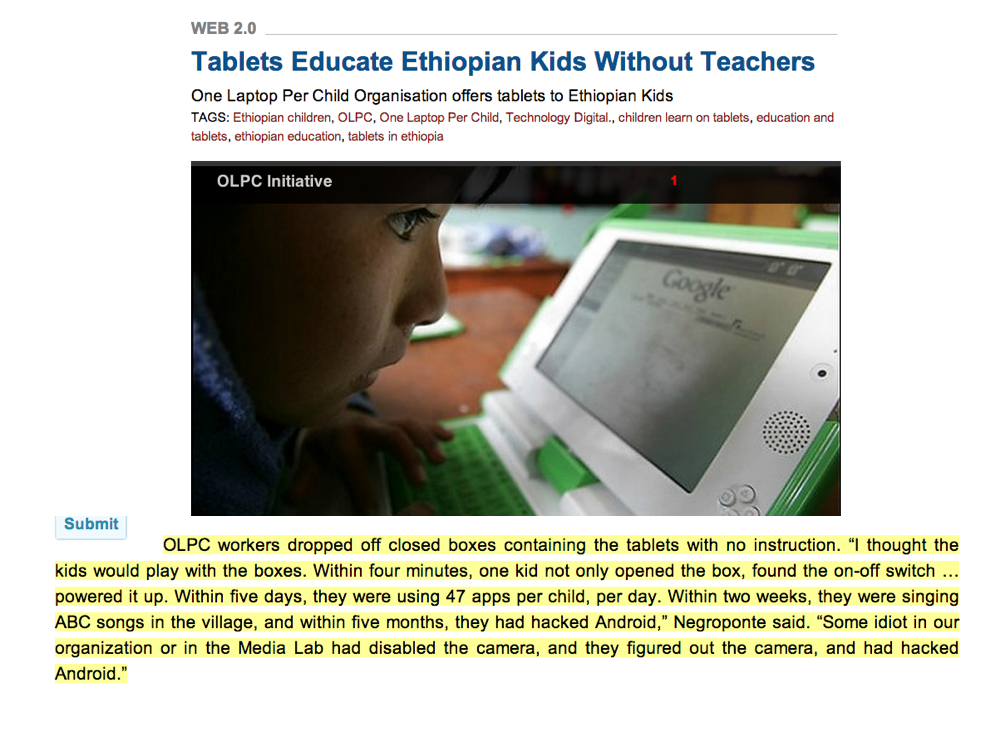
I have been using the picture and text above in a couple of recent presentations to educators surrounding the way we support learners (teachers and students) in accessing digital tools.  The picture and text come from a post on Technology Digital a couple of weeks regarding the One Laptop Per Child program.
Shouldn’t the highlighted text cause us to rethink some of our overly structured ways? I’ll cite it again below in case the text from the slide above is too hard to decipher:

OLPC workers dropped off closed boxes containing the tablets with no instruction. “I thought the kids would play with the boxes. Within four minutes, one kid not only opened the box, found the on-off switch … powered it up. Within five days, they were using 47 apps per child, per day. Within two weeks, they were singing ABC songs in the village, and within five months, they had hacked Android,” Negroponte said. “Some idiot in our organization or in the Media Lab had disabled the camera, and they figured out the camera, and had hacked Android.”

In my mind, we spend way too much time walking people through tedious lessons on how to do very basic things with technology in our schools. In many cases we would be better throwing the unopened boxes out to our staff and or students and let them figure it out on their own. But if we can escape our traditional upbringings here and look at the evidence here and the similar finding of Sugata Mitra with his Hole in the Wall Project, I believe we can move much faster.

We are the only ones holding us back!

7 Reasons iPads Rule?

English: iPads offer a variety of software
English: iPads offer a variety of software (Photo credit: Wikipedia)


Some impressive facts from ign.com on the impact of iPads:
  • Over 100 million sold 
  • iPad sales topped all other PC Manufacturers in the second quarter of 2012
  • 94 percent of Fortune 500 companies use iPads “in an official capacity.”
Despite these mind-blowing numbers, I am always interested in the discussion of what device is best in an educational setting.  Audrey Watters wrote a post this week asking, “Why Tablets?” that got me thinking about this a bit more, especially given the fact that we currently have over 1,200 iPads in Burlington, a number that will soon be over 2,000 as we deploy iPads at the middle school level.
Audrey wrote the following about iPads:

 I was struck once again by the abundance of hype over tablets. I confess, I just can’t do the work I need to do on an iPad, but I don’t want to suggest that that means they’re useless for others. It does make me wonder about what I’m missing by being a skeptic, as well as what students are missing when we give them tablets and not (my preference) laptops.

While I love the iPad myself, I too find myself utilizing my laptop first in many cases.  I feel quite guilty sometimes by the fact that I can pull out my MacBook Air to accomplish many tasks while students only have an iPad to access.   While I have tried at certain points to put away my laptop and get through my day with the same device that our students have, I have not been successful in doing this for more than a day.

Thinking back to our 1:1 planning meetings, I remember our main issues were cost, battery-life, and ease of use.   We looked at laptops and minis for a while and then the iPad hit the market it quickly moved to the top of the list (since we could not afford MacBooks for everyone).  Of I wondered if we were just buying the shiny new toy that the novelty would wear off quickly.

While we certainly did buy the shiny new toy and yes the novelty has warn off a bit, our satisfaction with our choice has lessened little.  The main reason is that for even the most techno-phobic user the iPad could not be easier to utilize.  There is no complicated operating system to deal with or software to learn. The ease-of-use allows us to focus our time and energy on the numerous resources that we now have at our fingertips. Instead of training on the device, we are spending our time referencing our learning goals and pulling in from the plethora of resources that allow us to reach them in new and engaging ways.

In regard to the list of reasons that iPads rules, I really don’t have a list of reasons.  Honestly, it’s up to learners to find out which tools/resources work best for them.  Make your own list! It’s a lot more fun than using someone else’s! 

Enhanced by Zemanta

Answering Questions About iPads In Burlington

English: iPad with on display keyboard
English: iPad with on display keyboard (Photo credit: Wikipedia)

We have gotten a lot of inquiries about iPads in Burlington since deploying over 1,000 iPads at our high school in the fall of 2011. As we continue plans for a February deployment at our Middle School and work with pilots at our elementary schools it is interesting to reflect on the questions that we get from other schools and how some of our answers/solutions to issues change over time.  In addition, it is important to note that our answer to a particular question may not be the best answer for another school or district. 


The most important point in all of this is that educators and students in environments that allow the use of digital resources have the ability to connect and share best practices.  This culture of sharing is both valuable and fulfilling, and the best part is that immersing yourself in it can help everyone become more successful. 

Anyway, here is a list of questions I got this week in an e-mail from a fellow administrator in another district. I thought I would share the questions and answers here in the hopes that others could benefit from the responses and expand on them.

1)      What are the iPad’s used for?

It varies from one classroom to the next. In some classrooms they use them for note-taking, word processing, and web searches. Our Foreign Language Department has been able to do away with their former language lab due to the fact that the teachers now feel like they have a language lab in every classroom. 

2)       How many iPad’s are used for how many students?

We have one iPad for each student at the high school (just over 1,000 total). We will be 1:1 at the middle school in February (800 more students). We also have one first grade classroom at each of the elementary schools in a pilot and a fifth grade classroom at Pine Glen in a pilot. 

3)      Are the iPad’s used for administrative purposes? If so what? 

Administrators utilize the iPads to access our student management system and we plan on using them extensively when we implement the new evaluation system next year. 

4)      If apps are used, what subjects use the apps and what apps are the most educationally sound?

We use too many apps to list here and allow high school students to personalize their iPads by adding their own apps and having their music accessible. In regards to “foundation apps,” we promote the use of Evernote, Dropbox, Explain Everything, Google Drive, Notability. You can check out a number of reviews by our IT Staff and our Student Help Desk on these two websites: bpsedtech.org and bhshelpdesk.com.

5)      If the iPad’s are used for textbooks what textbooks fi the iPad the best? How are books put on the iPad? How are iPad’s with textbooks distributed the second year (when books are loaded)? 

We do not use the iPads for textbooks. We are in the process of pulling together our own on-line resources, utilizing a company called Net Texts.  At this point, we  feel strongly about not purchasing traditional textbooks or buying e-versions of textbooks from the textbooks companies. We would prefer to support our teachers in the curation of content that they can more readily revise each year.

6)      Do students/administrators type on the iPad? How are documents printed from the iPad’s?

There have been no significant problems typing on the iPad. We did not provide cases for all of the iPads, but instead got a neoprene which was donated by the Burlington Chamber of Commerce with some ads from local businesses. Some students chose to get cases that included a bluetooth keyboard while some choose to touch type right on the iPad. Another group uses the voice-to-text to dictate the rough drafts into the iPads and then makes the changes from there.

7)      What are the biggest positives from a student learning/administrative  point of view? 

One of the biggest positives has been the fact that staff has had to rely on students in many cases to help them learn how to use the iPads and some of the resources we now have access to. I believe that it has helped us become less of a teacher-centered school and more of a learner-centered school where we are all learners together.

8)      What are the biggest negatives? 

I think the concerns are that we address misuse of digital resources and have conversations about balance. We are not promoting an “all iPad, all the time” environment. Thoughtful lesson-planning means integrating appropriate resources whether they are technology-based or not. 

Questions about How the iPad’s Are Deployed

9)      Do the iPad uses depend on regular wireless access? How much of the building/school system is wireless? 

We have wireless throughout all of our school buildings.  There are certainly ways to utilize the iPads without wireless access, but I think the infrastructure of a school or district should be upgraded before the integration of wireless devices.

10)   Are the iPad’s bought or leased? 

We pay for our iPads through a three-year lease to own program. 

11)   Who handles iPad repairs? How are the iPad’s re-charged? 

We have a student help desk which is the front line of handling iPad issues. They are supported by staff who can step in and resolve issues that they cannot.  However, the issues that the schools are unable to resolve are very few. In regards to charging, students recharge the iPads at home after school. Because the iPads are not used every minute of every day, they can go multiple days without being recharged.  Charging of devices has been a non-issue.

12)   What training was done for technology staff? For teachers? 

We spent a great deal of time leading up to the deployment sharing digital resources with staff and offering numerous sessions on resources that we thought that they would find most useful. We have given staff a great deal of time to get together informally as well to share what is working and what is not. Again, having the help desk available throughout the school day allows staff and students to get questions answered and learn about resources in which they are interested.

13)   Are the iPad’s networked in any way? What hardware/software is used in networking? 

All of our iPads access our school network. We currently use a browser from Lightspeed Systems that ensures that the student iPads go through our server and our filtering whether they are in or out of school.

14)   How is software loaded on the iPad’s? How is the software purchased? 

At the high school level, most of the apps utilized are free apps that students load themselves.  At the middle and elementary levels the apps are loaded by the IT staff via a synching cart. Pay for apps that are bought by the school are done through the volume purchasing program.

Enhanced by Zemanta

Answering A Few Questions From My Sessions At AASSP/AAMSP Fall Conference


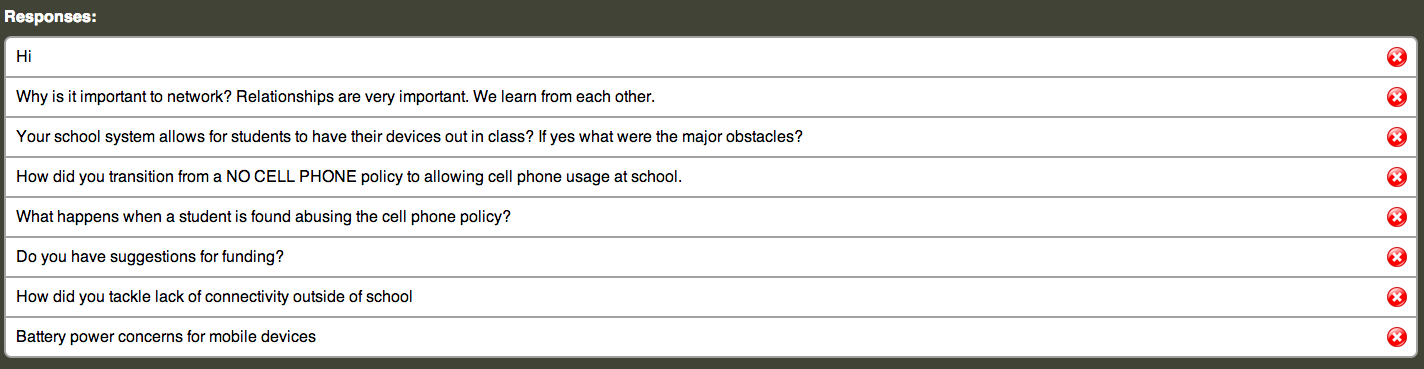
I was fortunate to have the opportunity to provide a keynote and a breakout session at the AASSP/AAMSP Fall Conference which was organized by Council for Leaders in Alabama Schools in Orange Beach, Alabama this week. The two sessions were titled – Leading in a Learner-Centered Environment and Transparent Leadership. During each of the sessions, I used Socrative and allowed audience members to ask questions using the short answer option from Socrative. (See the responses below).

At the end of the sessions we had a chance to answer a few of the questions, but there were a few that we did not get to discuss. Since the list is relatively short, I will respond to all of the questions below.

 At the end of the sessions we had a chance to answer a few of the questions, but there were a few that we did not get to discuss. Since the list is relatively short, I will respond to all of the questions below.

Why is it important to network? 

The question above was a key focus of the session on Transparent Leadership as we discussed not only why it is important to network, but how to use digital resources to expand our networks beyond what we were capable of in the past.  Who you know and who you can learn from has always been an important factor for individuals.  It is imperative that school leaders are modeling the use of the most current resources to show all of the learners in their communities how they build their network to collaborate and learn with/from others. 

 If your school allows students to bring their own devices, what are the major obstacles?

We provide the devices for students here in Burlington where all of the students have iPads.  There is a lot of information out there about BYOD programs. Here is an article that Peter DeWitt wrote for Education Week back in August. I have also saved a number of articles on BYOD in my Diigo bookmarks

 How do you transition from NO CELLPHONE POLICY to allowing cellphones in School?

Here’s a link to a blog post that I wrote back in 2009 when we started to discuss the change in our policy. The bottom line for me is that we need to provide more resources to our classroom teachers and not take away access to resources that they want to utilize in their classrooms. Our change in the handbook the next year went from “no cellphones” to “cellphones may be used at the discretion of the classroom teacher.” Due to the smooth nature of the transition, we opened it up the following year to cellphone use in the cafeteria and in the halls between classes. 

 What happens when a student is found abusing the cellphone policy?

The protocol is pretty similar to most situations where students are not compliant with school regulations. The first offense is a warning along with a discussion to find out what necessitated the use of the cellphone in a disruptive manner, the second offense and subsequent offenses call for the device to be sent to the Assistant Principal’s Office to be claimed by a parent. 

With the move to all students having iPads in the school, the use of cellphones in a disruptive manner has really been a non-issue. 

Do you have suggestions for funding?

At BHS we looked at some of the things that we had spent money on traditionally (i.e. textbooks) and decided we were going to use these funds differently. In addition, we cut way removed a number of printers and cut back on our paper consumption. While these savings did not cover the entire cost of the devices, we did get a good start in covering the cost. 

How do you tackle lack of connectivity outside of school?

In our town connectivity outside of school is not an issue.  We have a number of businesses in town that have free wifi. In addition, most people have a wireless connection at home.  For those who have a problem with this expense, Comcast offers internet access for low-income families for $9.99 a month.

 Battery power concerns for mobile devices?

Battery life was definitely a concern for us at BHS, especially when we considered the fact that the electrical infrastructure in our 40-year old building would not easily support 1,000 mobile devices being plugged in daily. Fortunately, the iPad solved this issue with its battery-life lasting multiple days for most students.


Please Vote For Our Seventh Graders Who Made PSA

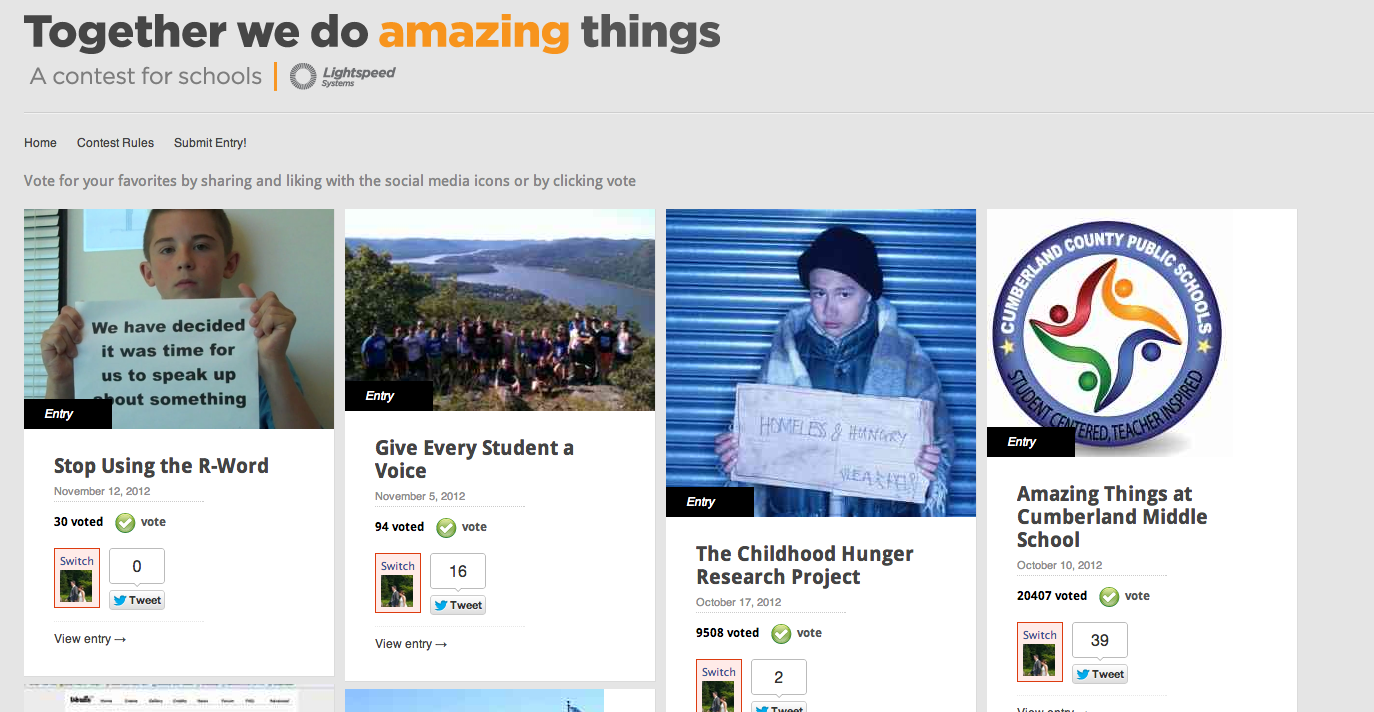
Our Marshall Simonds Middle School seventh graders who made a Public Service Announcement on the use of the R-word have been entered into a contest sponsored by Lightspeed Systems.  The winner of the “Together we do amazing things” contest will win $1,000 for their school.  Please take a moment to vote for our students here. 

If you missed the video when it was initially posted last month, please check it out by clicking on the link below.

Related articles

Enhanced by Zemanta

Edutopia Blog Highlights Work of BPS First Grade Teachers

A blog post by Andy Marcinek went up on Edutopia’s Site this week highlighting the efforts two Burlington Public Schools First Grade teachers have made this year to integrate technology into their classrooms. The two teachers, Irene Farmer from Francis Wyman and Erin Guanci from Pine Glen, are part of our first grade iPad pilot and they shared their insights from the first few months of the school year with Edutopia.


cc licensed ( BY ) flickr photo shared by flickingerbrad

From the Edutopia Post 

In my last two posts, I detailed the iPad initiatives at Burlington High School. I talked about what we learned after a year of a 1:1 iPad environment and dispelled some myths surrounding iPads in education. Recently, I had the opportunity to connect with two of my elementary teachers at Pine Glen Elementary and Francis Wyman Elementary schools. This year, four first grade classrooms will be piloting a 1:1 iPad environment. The iPads stay in the classroom and are only used during class time. Two of the teachers involved, Irene Farmer and Erin Guanci, sat down with me and answered a few questions about their expectations of the initiative, how they are using the device at the moment, and how they feel it will work in an elementary classroom.

Read the rest of the post here

Enhanced by Zemanta

Thanks To Ms. Hayes and Her Class For A Great Morning!

Thanks to Ms. Hayes and her fourth grade class for inviting me to morning meeting today and sharing so many of the exciting things that they have bee up to lately.  The visit started with all of us in a circle greeting each other by saying good morning to the people sitting immediately to our right and left.  The sense of community and caring was evident from the minute I stepped in the class and heard students share their insights on different topics. 
In addition, the students were so excited to share their iMovie videos that they made their parents for Back-To-School Night last month. A few of the students even agreed to write a blog post about it for our Learning Every Day Blog.  I also received a number of e-mails from the students after I left thanking me for visiting and sharing more reflections about their learning. 
It was a great way to end the week and it reinforced the fact that I need to be spending a lot more time in Burlington classrooms. It is so much more fun learning with our students than it is sitting in Central Office. Thanks again to Ms. Hayes and her class for the reminder! I will definitely be seeing them again soon!