Edweek Highlights Burlington’s EdTech Efforts

The video above appeared on Education Week’s Digital Directions Website back at the beginning of February.  We are certainly fortunate to be gaining this type of recognition nationally for the phenomenal efforts that staff members have made to integrate technological resources into their classrooms.

Enhanced by Zemanta

Don’t Miss This Month’s Parent Tech Night – Social Media And Our Children

Social Media and Our Children
Tuesday, February 26, 2013
Marshall Simonds Middle School Learning Commons
7-8 PM 

As a parent of three, I am amazed at the role social media plays in the lives of my three children. While doing my best to keep tabs on my son Timothy who is a 9th grader and recently started a Facebook account and my daughter Bryn, a 7th grader who is an Instagram lover, I wonder sometimes whether I am doing enough to guide them in the appropriate use of these communication tools.  It can certainly be overwhelming! I can’t even imagine what is coming down the road for my first-grader (pictured above) who is taking it all in

With this in mind, we invite parents to the February topic in our Technology Series For Parents – Social Media And Our Children.  Please join Burlington Public Schools Director of Instructional Technology and me as we discuss some of the most popular Social Media sources of our students. We will discuss how parents can keep tabs on their children and share best practices in appropriate use of these resources.
We will also spend a little time discussing School Connect, a wonderful communication tool that the school district will be launching in March. 

Finally, time during every Parent Tech Night session is also dedicated to technology related questions and support. All are welcome, so please feel free to bring a friend!
Enhanced by Zemanta

Are You Sure Your Child Isn’t Using Social Media?

What Apps Is Your Child Using?
Just because your child does not have a Facebook or Twitter account does not mean they are not using social media resources.  I have been hearing rumblings from various communities (including Burlington) about elementary and middle school-aged children making poor choices with social media resources.  I am certain that in many cases that the parents of these kids are unaware that their kids are over-sharing personal information, posting and viewing inappropriate pictures, and having inappropriate conversations with friends AND STRANGERS.
The bottom line here is that parents need to check on every app at that their children are adding to their iPod, iPad, iPhone, or other web-enabled device. We have moved so quickly from the days when our biggest web-based concern regarding our children was a desktop computer in a common area of our homes. As we are well aware, many of the gadgets that they carry in their pockets can do so much more than those desktops could ever do. With new social media apps and websites coming onto the scene at a breathtaking pace, it is not surprising that parents can’t keep up. 
A Little Advice For Parents

So as I navigate this landscape with my own kids, I want to let you know that just keeping your kids off of Facebook and Twitter is a far cry from keeping them off of social media.  In an effort to promote awareness, I have a few questions for parents…
  1. Do you know what apps are on your child’s iPad, iPod, Smartphone, etc.?
  2. Do you know which apps are connected to social media resources?
  3. Do you monitor the social media accounts that you have allowed your child to create?
  4. Have you heard of snapchat
If you answered no to at least one of the above questions then you are probably in the majority of parents out there.  If you answered yes to most of the above questions then please share your knowledge with the parents you know to help them stay on top of what is happening.  The fact of the matter is that these sites typically require a user to be at least 13 years of age to register and many kids lie about their age in order to sign up which raises an additional issue.  
In regards to Snapchat, you get bonus points if you know that one.  Snapachat has become known by many as a tool for sexting as a recent Mashable post describes.  The way it works is that an individual may send another individual a picture and the sender decides how long the person receiving the picture can view it (from 1-10 seconds) and then the picture disappears “forever.”  Of course since lesson number-one in the whole social media game is that anything you say online can follow you “forever,” we know this is not true.
From a parent’s perspective, it is tough to connect the current experience that our children are having with social media resources to our own experiences growing up.  All we really had was a telephone to connect with our friends and have social conversations. In addition, most of us had some time limits in place when it came to these conversations. In my opinion, it would make sense for us all to at least have some idea of how much time are kids are spending online and what they are up to.
Some Resources For Parents
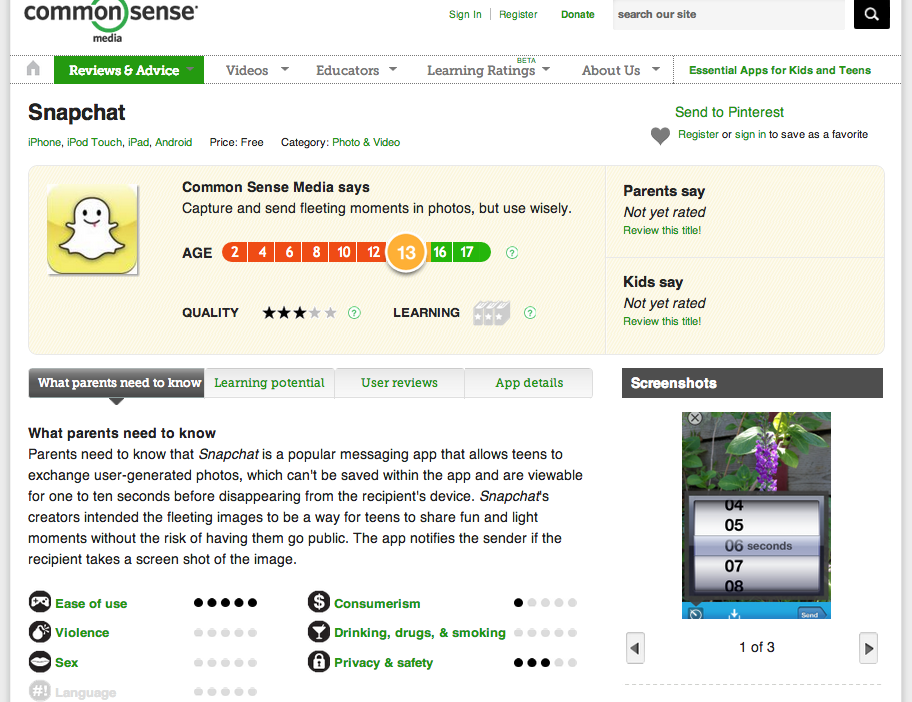
Common Sense Media has some great resources for parents to help them set appropriate ground rules for their kids. It also provides parents with great app reviews, like the one below for Snapchat. You can search with the box in the upper right hand corner for a review of most apps and find out some useful information before deciding whether or not it is appropriate for your child.  
We will continue to provide workshops for parents to learn about these issues, but in the meantime I encourage parents to check out a few of the following:
Tweens Secret Lives Online – The Wall Street Journal
If you feel you are a parent who has a good handle on this issue, then please share some of the practices that you think are working well! If you are parent who feels lost and needs immediate assistance, please contact me and I would be happy to offer some advice/assistance (larkin@bpsk12.org).

Ramblings From My Reading (Edition 1)

One of my favorite things to do is read about education. My main source of information is the numerous blogs that I follow through my Google Reader account. Last year I was pretty good about sharing some of the things that I found most interesting each week and now, since we are a few weeks into 2013, I am going to try to get back to sharing some of the most interesting items that I come across each week.

The first item this week, is a clip from Sugata Mitra that comes from The 16th International Conference on Thinking in Wellington, New Zealand.  In the clip, Mitra makes a case for the long-overdue change in the focus of our schools to prepare students for success in the world that they will need to navigate when they end their formal education.

Mitra advocates for a curricular focus on the following three areas:

  1. reading comprehension
  2. information search and retrieval skills
  3. teach them how to believe – (What’s the machine that allows students?) Some people call this “crap-detection”
The clip ends with Mitra making the following statement:

“The biggest job (we have) is to give the child an armor against doctrine just like we did in another generation by teaching them to fight with a sword and ride a horse.”

Another thing that has me continuing to question the relevance of our focus in traditional classrooms is a post from Ryan Bretag, titled Grade Focused Students. Ryan, an educator in Illinois,   wrote an intriguing post after reading a story from The Globe and Mail titled An A+ Student Regrets His Grades.

The post began with the following quote from The Globe and Mail article:

“The system teaches us that if you get ‘As’ across the board, you’ll be successful. And if you fail a course, you’ll be labelled incompetent or hopeless. These pressures force students to regard education as a mere schooling tenure where the goal is to input a sufficient amount of work to output the highest possible grades. We sacrifice learning for schooling.”

Ryan wondered if this pressure was real or imagined on the part of students. But whichever is the case, he is spot on with his final thoughts:

“schools are filled with grade focused students with grade grubbing, fixed mindsets when we should have schools filled with learning focused learners with growth mindsets. “

My own concerns centers around the same feelings and whether or not a focus on attaining high marks assures anything down the road for our students.  I left the following comment on the blog in reference to my own son’s first semester in high school:

“I have been struggling with this same thought for quite sometime as an administrator, but the level of discomfort has become even greater as my own son has reached high school. Being a competitive person, he has his sights set on what it will take to get into competitive colleges and sadly, for him, that means getting A’s. He has already figured out what it will take to achieve this mark with each of his teachers. In some classes, he can pull this off with minimal effort while in a couple of others he has to spend a good deal of time. However, there is no instance where I see him being engaged in a course because of a love of the content and the authentic learning tasks that he is involved in. He is simply “playing the game of school” and I am not sure what this will accomplish in the end.

BPS Back on NPR’s Here and Now Show On Our iPad Initiative

I was accompanied by BHS senior Sidd Chhayani a few weeks back on a trip into Boston’s NPR radio station WBUR to appear on the show Here and Now with Robin Young to discuss our iPad initiative after year one. We did an initial interview last year and learned it was the most popular segment from last year’s programs. 

You can hear the entire interview above.  There was also a live webchat today on the show’s webpage where listeners were able to take part and ask questions. Thanks to Here and Now for the opportunity to talk about our efforts in Burlington!

Back to School With New Worries, But The Same Plan

Official seal of Newtown, Connecticut
Official seal of Newtown, Connecticut (Photo credit: Wikipedia)
I dropped my six-year old daughter off at school Friday at about 8:30.  As I walked her in the front door, we were greeted by the Principal who greets every child who walks in the door at the school each morning. Then we ran into my daughter’s teacher who asked if she wanted to go to the classroom early with her since the buses were a few minutes from arriving. I drove away from the school feeling very much at peace with the fact that my daughter would have another great day in her first grade class and would return home safely at the end of the day.

But before my daughter finished her school day, our world was turned upside-down due to the unimaginable occurrence at Sandy Hook Elementary School in Newtown, Connecticut. I am not going to rehash the details here as we are all aware of the unfathomable events that took place.  However, the reality is that as both a parent and administrator I now have new worries to contend with that never would have entered my mind before yesterday.  Parents like me, who sent their kids off to school feeling the same sense of security I did with my daughter, did not have their kids return home safely.

The emotional roller coaster that we have all been on since Friday is something that is unprecedented.  But in spite of all of this, my first grader, my seventh grader, my ninth grader, and my three step-children will all return to their schools tomorrow where they will be put in the hands of wonderfully caring teachers and administrators just like those at Sandy Hook.

As we get ready to start the new week, I have been searching for words to help make sense of this. The words of Robert Evans, Ed.D. and Mark Kline, Psy.D. from Wellesley’s community mental health agency sum up the uncomfortable truth we are all grappling with:

“There is no technology or template for coping with this kind of event. We feel shock and disbelief, sorrow for the victims, anger at its unfairness…And most of us think immediately about how to be helpful to our children.”

Our ultimate goal as parents and educators is to do everything in our power to support our children during this traumatic period.  Again Evans and Kline have advice for us:

Above all, coping with such an awful event is not primarily a matter of technique, not something best handled by a particular set of tactics that deviate sharply from one’s familiar patterns of communication. The regular routines of both school and family life are, all by themselves, a source of comforting continuity and assurance. Adults will rarely go wrong by relying on what is most basic between them and their children—caring and connection. At these times, your presence—your simply being with them, their knowing that you are available—can be just what they need.”

We will be present tomorrow and we will continue to care deeply for our students.  There will never be an alternative.

Enhanced by Zemanta

We Can Learn A Lot From First Graders In Ethiopia About Tech Integration!

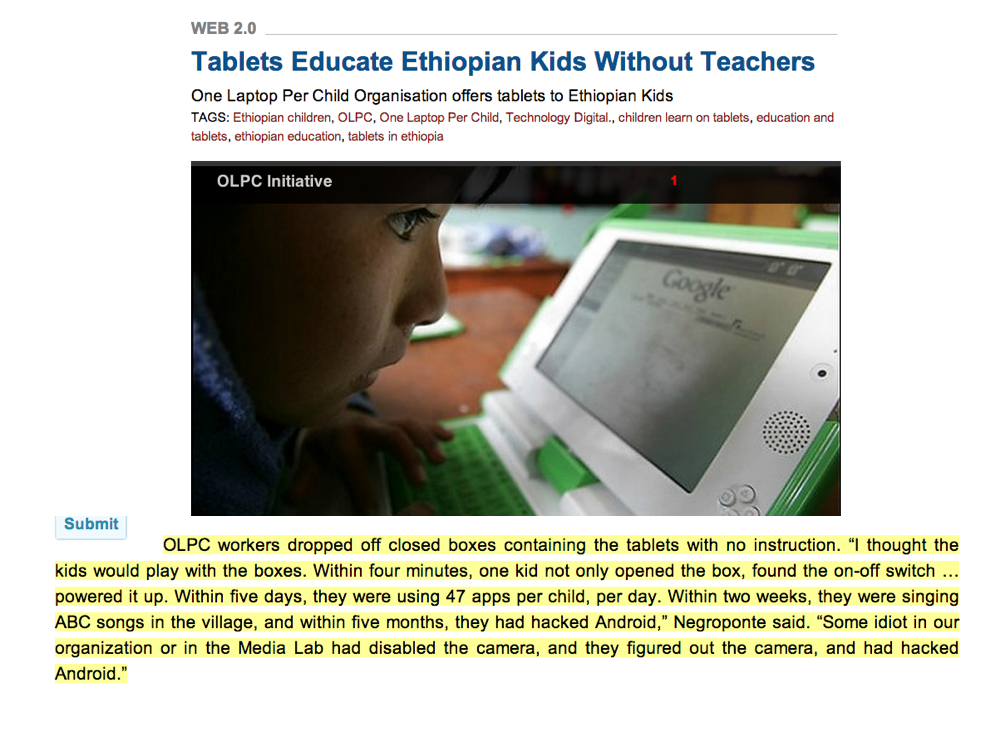
I have been using the picture and text above in a couple of recent presentations to educators surrounding the way we support learners (teachers and students) in accessing digital tools.  The picture and text come from a post on Technology Digital a couple of weeks regarding the One Laptop Per Child program.
Shouldn’t the highlighted text cause us to rethink some of our overly structured ways? I’ll cite it again below in case the text from the slide above is too hard to decipher:

OLPC workers dropped off closed boxes containing the tablets with no instruction. “I thought the kids would play with the boxes. Within four minutes, one kid not only opened the box, found the on-off switch … powered it up. Within five days, they were using 47 apps per child, per day. Within two weeks, they were singing ABC songs in the village, and within five months, they had hacked Android,” Negroponte said. “Some idiot in our organization or in the Media Lab had disabled the camera, and they figured out the camera, and had hacked Android.”

In my mind, we spend way too much time walking people through tedious lessons on how to do very basic things with technology in our schools. In many cases we would be better throwing the unopened boxes out to our staff and or students and let them figure it out on their own. But if we can escape our traditional upbringings here and look at the evidence here and the similar finding of Sugata Mitra with his Hole in the Wall Project, I believe we can move much faster.

We are the only ones holding us back!

Answering Questions About iPads In Burlington

English: iPad with on display keyboard
English: iPad with on display keyboard (Photo credit: Wikipedia)

We have gotten a lot of inquiries about iPads in Burlington since deploying over 1,000 iPads at our high school in the fall of 2011. As we continue plans for a February deployment at our Middle School and work with pilots at our elementary schools it is interesting to reflect on the questions that we get from other schools and how some of our answers/solutions to issues change over time.  In addition, it is important to note that our answer to a particular question may not be the best answer for another school or district. 


The most important point in all of this is that educators and students in environments that allow the use of digital resources have the ability to connect and share best practices.  This culture of sharing is both valuable and fulfilling, and the best part is that immersing yourself in it can help everyone become more successful. 

Anyway, here is a list of questions I got this week in an e-mail from a fellow administrator in another district. I thought I would share the questions and answers here in the hopes that others could benefit from the responses and expand on them.

1)      What are the iPad’s used for?

It varies from one classroom to the next. In some classrooms they use them for note-taking, word processing, and web searches. Our Foreign Language Department has been able to do away with their former language lab due to the fact that the teachers now feel like they have a language lab in every classroom. 

2)       How many iPad’s are used for how many students?

We have one iPad for each student at the high school (just over 1,000 total). We will be 1:1 at the middle school in February (800 more students). We also have one first grade classroom at each of the elementary schools in a pilot and a fifth grade classroom at Pine Glen in a pilot. 

3)      Are the iPad’s used for administrative purposes? If so what? 

Administrators utilize the iPads to access our student management system and we plan on using them extensively when we implement the new evaluation system next year. 

4)      If apps are used, what subjects use the apps and what apps are the most educationally sound?

We use too many apps to list here and allow high school students to personalize their iPads by adding their own apps and having their music accessible. In regards to “foundation apps,” we promote the use of Evernote, Dropbox, Explain Everything, Google Drive, Notability. You can check out a number of reviews by our IT Staff and our Student Help Desk on these two websites: bpsedtech.org and bhshelpdesk.com.

5)      If the iPad’s are used for textbooks what textbooks fi the iPad the best? How are books put on the iPad? How are iPad’s with textbooks distributed the second year (when books are loaded)? 

We do not use the iPads for textbooks. We are in the process of pulling together our own on-line resources, utilizing a company called Net Texts.  At this point, we  feel strongly about not purchasing traditional textbooks or buying e-versions of textbooks from the textbooks companies. We would prefer to support our teachers in the curation of content that they can more readily revise each year.

6)      Do students/administrators type on the iPad? How are documents printed from the iPad’s?

There have been no significant problems typing on the iPad. We did not provide cases for all of the iPads, but instead got a neoprene which was donated by the Burlington Chamber of Commerce with some ads from local businesses. Some students chose to get cases that included a bluetooth keyboard while some choose to touch type right on the iPad. Another group uses the voice-to-text to dictate the rough drafts into the iPads and then makes the changes from there.

7)      What are the biggest positives from a student learning/administrative  point of view? 

One of the biggest positives has been the fact that staff has had to rely on students in many cases to help them learn how to use the iPads and some of the resources we now have access to. I believe that it has helped us become less of a teacher-centered school and more of a learner-centered school where we are all learners together.

8)      What are the biggest negatives? 

I think the concerns are that we address misuse of digital resources and have conversations about balance. We are not promoting an “all iPad, all the time” environment. Thoughtful lesson-planning means integrating appropriate resources whether they are technology-based or not. 

Questions about How the iPad’s Are Deployed

9)      Do the iPad uses depend on regular wireless access? How much of the building/school system is wireless? 

We have wireless throughout all of our school buildings.  There are certainly ways to utilize the iPads without wireless access, but I think the infrastructure of a school or district should be upgraded before the integration of wireless devices.

10)   Are the iPad’s bought or leased? 

We pay for our iPads through a three-year lease to own program. 

11)   Who handles iPad repairs? How are the iPad’s re-charged? 

We have a student help desk which is the front line of handling iPad issues. They are supported by staff who can step in and resolve issues that they cannot.  However, the issues that the schools are unable to resolve are very few. In regards to charging, students recharge the iPads at home after school. Because the iPads are not used every minute of every day, they can go multiple days without being recharged.  Charging of devices has been a non-issue.

12)   What training was done for technology staff? For teachers? 

We spent a great deal of time leading up to the deployment sharing digital resources with staff and offering numerous sessions on resources that we thought that they would find most useful. We have given staff a great deal of time to get together informally as well to share what is working and what is not. Again, having the help desk available throughout the school day allows staff and students to get questions answered and learn about resources in which they are interested.

13)   Are the iPad’s networked in any way? What hardware/software is used in networking? 

All of our iPads access our school network. We currently use a browser from Lightspeed Systems that ensures that the student iPads go through our server and our filtering whether they are in or out of school.

14)   How is software loaded on the iPad’s? How is the software purchased? 

At the high school level, most of the apps utilized are free apps that students load themselves.  At the middle and elementary levels the apps are loaded by the IT staff via a synching cart. Pay for apps that are bought by the school are done through the volume purchasing program.

Enhanced by Zemanta

Please Vote For Our Seventh Graders Who Made PSA

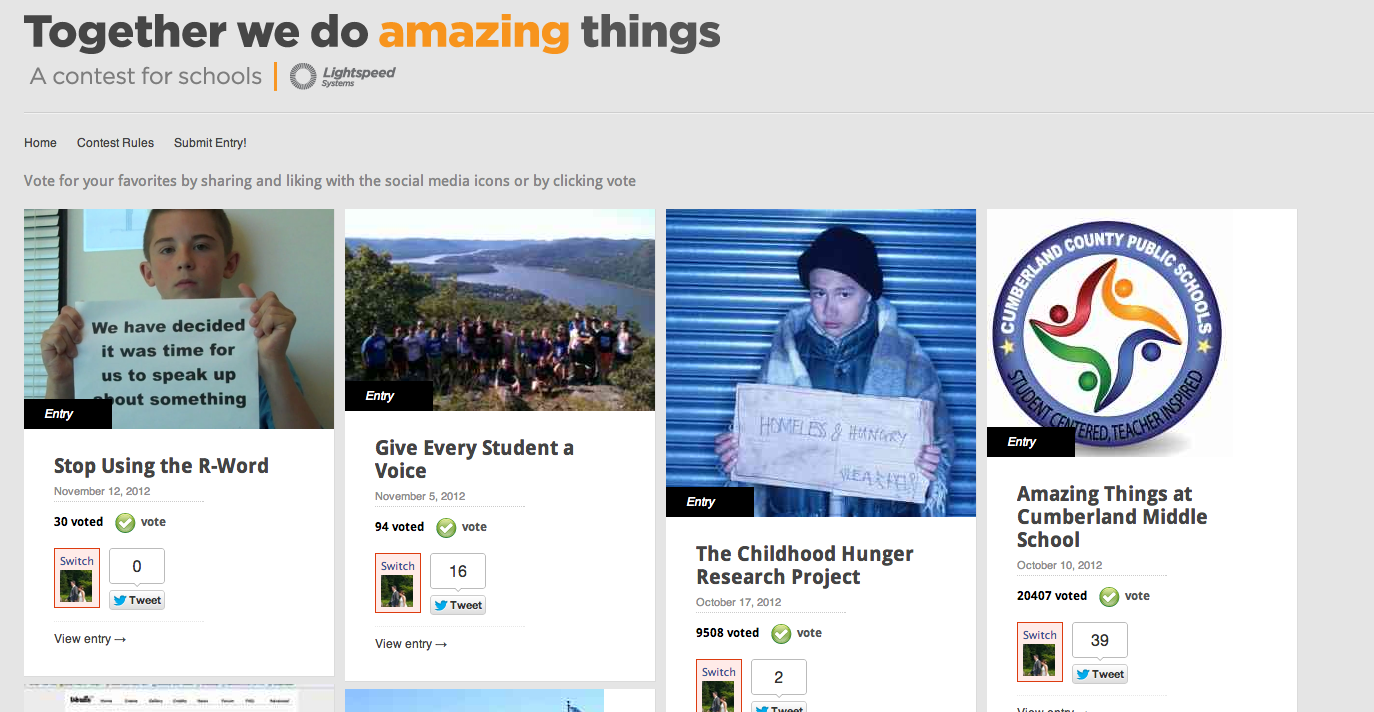
Our Marshall Simonds Middle School seventh graders who made a Public Service Announcement on the use of the R-word have been entered into a contest sponsored by Lightspeed Systems.  The winner of the “Together we do amazing things” contest will win $1,000 for their school.  Please take a moment to vote for our students here. 

If you missed the video when it was initially posted last month, please check it out by clicking on the link below.

Related articles

Enhanced by Zemanta

Thanks To Ms. Hayes and Her Class For A Great Morning!

Thanks to Ms. Hayes and her fourth grade class for inviting me to morning meeting today and sharing so many of the exciting things that they have bee up to lately.  The visit started with all of us in a circle greeting each other by saying good morning to the people sitting immediately to our right and left.  The sense of community and caring was evident from the minute I stepped in the class and heard students share their insights on different topics. 
In addition, the students were so excited to share their iMovie videos that they made their parents for Back-To-School Night last month. A few of the students even agreed to write a blog post about it for our Learning Every Day Blog.  I also received a number of e-mails from the students after I left thanking me for visiting and sharing more reflections about their learning. 
It was a great way to end the week and it reinforced the fact that I need to be spending a lot more time in Burlington classrooms. It is so much more fun learning with our students than it is sitting in Central Office. Thanks again to Ms. Hayes and her class for the reminder! I will definitely be seeing them again soon!