Guest Post: Thoughts on Year One of 1:1 in Grade One

This was first posted on Ms. Farmer’s Classroom Blog:

One of the lucky ones?
Through a grant announcement at the end of last year, I learned that I would be one of four first grade classrooms in our district to pilot a 1:1 initiative with iPads this year.    I was excited and VERY NERVOUS to embark on such an endeavor.

Why Me?
I wasn’t chosen to pilot the iPads because of my extensive knowledge and experience of iPads.  I had very limited experience through the use of a some school-wide iPads made available a few times the previous year.  The classrooms chosen to pilot this initiative were ones which taught struggling readers specific skills through targeted instruction.  My job was to learn how to use these devices to enhance their learning.  But how?  I needed answers — and quick!  So I attended many summer workshops in preparation prior to the beginning of this school year.  And I consulted with the technology gurus in my district (there are many in Burlington — thanks to our incredible Tech team!).  I also immersed myself in reading about the first scientific study which was demonstrating the success of iPads in improving literacy in kindergartens in Auburn, ME.  (To read more about this incredible study, click here: ipad-improves-kindergartners-literacy-scores )

I had so many questions, but the more I looked for the answers, the more questions I had.  Little did I know that I was to learn the most from simple exploration … and from the students themselves.

The iPads Arrive…
The iPads rolled into my classroom around the third week of school.  I was still in the midst of teaching classroom rules, routines and how to take care of classroom materials.  Perfect.   They had some apps already loaded onto them, but we weren’t going to start there.  The students needed to know how to turn them off and on; how to carry them; where to use them; how to plug them into the charging cart (still a challenge), etc.

OK, first item to check off the list was “Routine”.  This took a week.  One thing I am sure about is the nature of a first grader.  If you don’t teach them proper care at the onset, you are teaching proper care for the entire year…and not much more.  It’s very similar to teaching them to put the cap back on a glue stick to keep it from drying out.  The difference being that this “glue stick” was very expensive!

Now What?
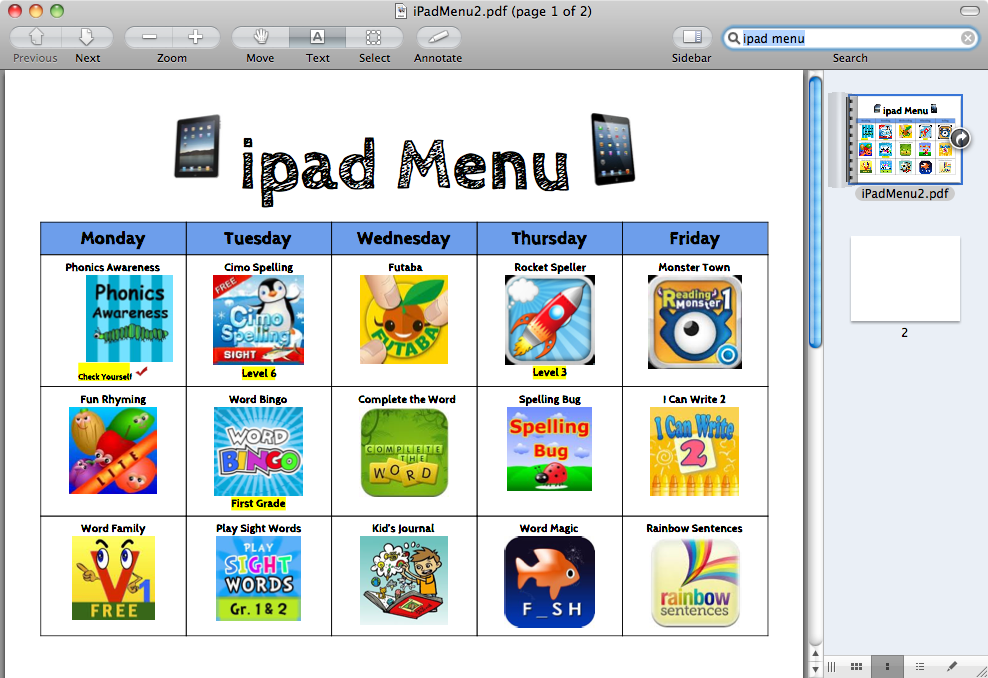
It took the children nearly no time at all to learn how to use the iPad.  In the beginning of the year, they would have to use the apps in a small group with a teacher present to make sure they were using the app correctly and not just pushing random buttons (it happens).  As the year went on, the app could be introduced merely by displaying it on my Smartboard through the use of “Reflection” on my laptop.  We would play a few rounds of an app as a class and then I would set it out as a station.  My wonderful colleague and fellow iPad pilot, Erin Guanci, then created (and shared with me!) many iPads menus with apps from which the children could choose.  Here is a sample:
I also used the Voice memo on the iPad to have the children record themselves reading.  The  student and I would then listen to the recording.  I would pause the recording when the child made an error and then teach the child how to use their strategies to self-correct their miscue.  The Voice Memo app became both an invaluable teaching tool and an electronic library collection of books which the children had read throughout the year.  (Plus I could now share the child’s reading with their parents via e-mail and at parent-teacher conferences).

In Math, as in reading, the iPads were also invaluable in reinforcing skills.  Time, money and fact skills need repeated practice.  A teacher cannot teach a week-long unit on money, for example, and have first graders magically remember what a coin looks like, its value and how to add them together.  The iPads were useful in helping the children practice these skills for 10 minutes or so every morning during “free time” after I taugt the unit.  They loved it and it helped to reinforce these skills.  I could not have done this without an iPad.  No amount of “drill and kill” worksheets could give students the immediate response they need.  And I am only one person, so I certainly could not get to every child in the class on an individual basis in a ten-minute time frame.  Invaluable.

How Else Were The Ipads Used?
For more detailed information on how the ipads were used and what apps were used, click here: one-to-one-elementary-classroom by andrew-marcinek

This article details how Erin Guanci and I make use of the iPads.  More to follow on this subject in a future blog.

Now For the Big Question:

There is no doubt in my mind that the iPads have been effective and have increased engagement in a number of ways.  I know for a fact that all children are engaged when I am teaching a lesson as a whole group if they have an iPad in front of them and are working on the same task.  I can quickly glance around and see who understands and who is struggling.  My feedback can then be effective and immediate.  They are not daydreaming, rolling on the carpet or fooling with their friends.  They have a device in their hands and are very engaged.  By using the iPads to record their reading, students are increasing their reading fluency and providing me with a useful teaching tool.  

However, something continues to come up in conversations in regard to iPads which troubles me personally.  

I hear and read how educators need to teach 21-Century Skills and I agree with that 100 per cent.  But I have also read and heard some discussions (in casual conversation) about how districts may consider using less construction paper, markers, glue, building blocks, etc. since we have iPads.  This goes against every fiber of my being!  I am totally on board when it comes to making technology accessible to every child at an early age so that they can not only learn how to use the devices and learn from them but so that they also may be able to make educated and responsible decisions in regard to technology in their future.  However, I do not agree with reducing the use of paper, pencils, crayons, markers, paint, construction paper, scissors, building blocks, etc.  

What I do support is providing every child with a rich array of experiences — both technological and traditional.  In my view, balance is key.  Choice is important.

I have a simple observation to share.  Occasionally, when our school has indoor recess due to inclement weather, I invite the neighboring classroom of children who do not have iPads to come in and share iPads with my students.  In the beginning of the year, every child wanted to use the iPad and they had the opportunity to do so.  As the year progressed, however, and the novelty wore off, the childrn were given the choice of staying in my room to use the iPads or going into the neighboring classroom to draw, read books, play with blocks, paint, etc.  Can you guess what happened?

As the year progressed, the number of children using the traditional materials of paper, pencil, glue, paint and building blocks become equal to that of the number of children choosing to use the iPads.  I counted and it was equally split.  Choice had won.  This  has since happened on numerous occasions, so I’ll consider it my “informal” research.

How can children choose or gravitate toward that which they love and are passionate about if they are not given the opportunity to explore all paths of learning?  Should you sacrifice some traditional opportunities in lieu of technology? Isn’t it our job as educators to provide the landscape which allows choice and provides varied experiences?  Where are our future budding artists, builders and craftsman without tactile experience of paper, scissors, construction paper, paint, blocks, etc.? Also, what will lack of these hands-on experiences do to their cognitive and physical (fine motor) development?  What is wrong with providing it all?  It is possible.  I can attest to that.  As much as I am open to the idea of providing technological opportunities for our young children, I am closed to the idea of taking the other more traditional opportunities away.  I consider myself a very open-minded educator who embrace change.  Am I being too “old school?”  What are your thoughts on this?

Enhanced by Zemanta

Moving Beyond The Textbook Is Nothing About A Book

This was cross-posted on EdTechTeacher

As we make the transition away from textbooks as the primary resource for teachers and classrooms, it is understandable that so many people are looking for THE ANSWER which would allow them make this change with as little struggle as possible. Why wouldn’t we do this when most of us have been “schooled” to think that there is always one right answer to a question?  There is a great comfort in knowing that there is a solution out there just waiting to be found, a solution that we can wrap our heads and hearts arounds and then settle down with for the next few decades.

In Burlington, we started looking for the “next-best thing” a couple of years ago when we hosted our first Digital Publication Collaborative. However, as we provided a space for educators to get together and create we realized that there were multiple options. As we move towards our third annual Massachusetts Digital Publication Collaborative in June, we see even more alternatives out there in regards to tools that educators can use to organize content.

Our effort is focused on trying to show educators as many of the options out there as possible and letting the educators (who are the learners in this case) make the choice that works best for them.  Because in my mind, if we can’t get educators to understand the power of “User-Generated Learning” then the choice of a textbook, an iBook, an eBook, or any other resource really doesn’t matter.   With predictions clear are that our students will enter careers that do not presently exist, we need to ensure that we arm them with the skills to continuously generate their own learning.

Dr. Kristen Swanson explains this change clearly in her book Professional Learning in the Digital Age:

“Instead of relying on a content area expert or textbook, (learners) are reliable for finding meaningful information.”

We look forward to bringing learners together again this June!

Enhanced by Zemanta

Checking Out Some Art Work In Our Middle School

As I have mentioned before, one of the favorite aspects of my job is getting into classrooms and seeing some of the neat work that students are doing. One thing I wanted to share today comes from Ms. Phillips’ Art Students. The two pictures below are from a sixth grader who was working in photoshop with a drawing she had originally done on paper (shown immediately below).
My Photo Stream-999

Then on the enhancement (shown below), the student took a background from a a real image and put it as the background on her drawing.

My Photo Stream-998

The second neat thing I took away from Ms. Phillips’ students was their use of Quick Response (QR) codes on their artwork. If you are not yet familiar with QR codes, you can see one on the leg of the football player on the right side of the picture below and another on the right-bottom corner of the image at the bottom of this post. Scanning these QR Codes brings viewers of these pieces to the blog of the artist where you can read their reflections on their work.

My Photo Stream-999
My Photo Stream-996

Enhanced by Zemanta

Our First BPS Tech Advisory Committee Meeting

We held the first meeting of our district Tech Advisory Committee yesterday. Please see the notes below and feel free to comment or ask questions in the comment section. The goal of this committee is to ensure that all stakeholders have the opportunity to communicate concerns and questions as we continue to move forward with our technology integration plans. Along with that, we want to continue to provide multiple opportunities for parents to learn how to use digital tools and how to support the use of these tools by their students.

Burlington Public Schools Technology Advisory Committee
March 26, 2013
  1. Introductions – Present: Mark Sullivan (BHS Principal), Josh Murphy (Director of Student Information), Bob Cunha (Director of Technology), Dennis Villano (Director of Instructional Technology), Eric Conti (Superintendent), Patrick Larkin (Assistant Superintendent), Andy Marcinek (BHS Staff), RJ Dalton (BHS Student), Sidd Chhayani (BHS Student), Lisa Koman (Parent), Michelle Feist (Parent), Paul Tsitsopoulos (Parent), Kristin Russo (School Committee).


  1. Update from each level – Director of Instructional Technology Dennis Villano updated the group on the Marshall Simonds Middle School 1:1 iPad program. Here is a link to his recent blog post on the middle school 1:1 efforts.  In addition, Dennis shared news on the pilots in the elementary schools and noted that all of the first grade pilot teachers felt that the program should be expanded to all first grade classrooms. The high school continues to progress with technology being integrated into classrooms and BHS Principal Mark Sullivan reported that most of his teachers are utilizing these resources comfortably.

  1. Plans for additional technology next year – We continue to prepare for PARCC testing which will replace MCAS in 2015 and will have to be delivered online. We are happy to report that Burlington is one of less than 25% of the districts in the state which is PARCC ready now.  Incorporate more devices so that we are 1:1 K-12 within two years. First grade pilot teacher are unanimous

  1. Supporting families/community – It was noted that there is a continued need to support parents in how to manage what the kids have access to and how to monitor it.  There was also a recommendation to share information about  the newest apps and social media resources that our students are using so that parents can stay up to speed. In addition it was noted that parents need continued training on how to stay on top of the latest news from the schools and that we should not forgo traditional means of communication (i.e. newspaper).  

  1. Questions/Concerns – What percentage of teachers are using the iPads in the classroom at the high school?   Mr. Sullivan put the number at about 90%.

Another question regarding the online PARCC assessment  was whether or not students would be able to use a paper and pencil if they preferred that or were uncomfortable with the online test.  In response, we noted that the accommodations have not been finalized but it is our assumption that all students are expected to take the assessment online.
There was also a question about iPads going home in grades K-8 as they currently do in the high school. With the main concerns at this point filtering out of school and breakage, we are unclear at this point what the plans for iPads going home in grades K-8. This will definitely be a topic of conversation at future meetings.
  
Other Useful Links regarding BPS EdTech  


Next Meeting – April 23, 2013 – 2:30-3:30 in the Marshall Simonds Learning Commons

BPS Tech Advisory Committee To Meet Next Week

The initial meeting of our district’s Technology Advisory Committee will take place next Tuesday (March 26) at 2:30 at the high school.  This group, which will be comprised of parents, students, staff, and community members is being formed to provide feedback on various issues regarding technology integration in our school system.

As the technological landscape changes at an amazing pace, it is important that we include all stakeholders in the exciting conversations we will be involved in. In addition, we hope to expand our technology education offerings beyond our monthly Parent Technology nights to support even more individuals in our community. This group will play an important role in helping our district expand our collaborative and educational efforts in this area.

All our welcome to attend these meetings and offer their input. In addition, we will share a summary of what is discussed to ensure that interested individuals who cannot attend can remain in the loop.

School Connect App Live Today!!!

We are excited to offer a new way for Burlington families and staff to get updates from Burlington Public Schools! The School Connect App is now live and it will allow users to get updates on school closings and other important news sent directly to their smart devices.

In addition, there is a web-based service that also allows for users to get the same information. As we move forward, this will also allow individual schools, individual teachers, and clubs and activities to send out updates to interested parties.

 Please see the brief video below on how to get the School Connect App.

Another Example of How Building A Network Benefits Students

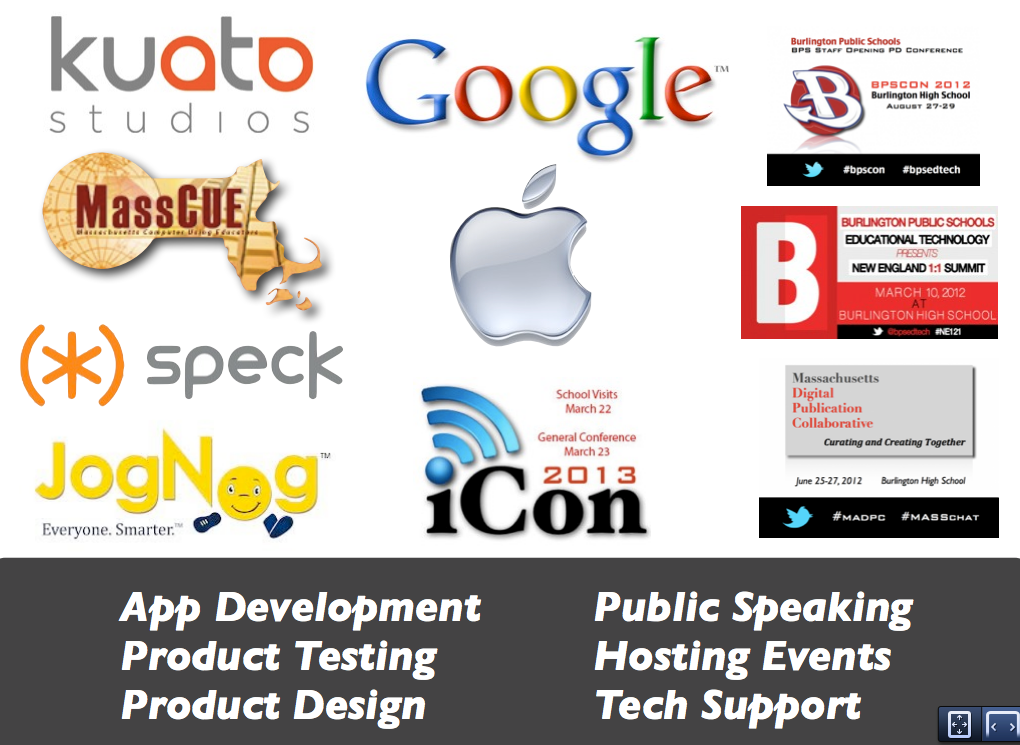
One of the exciting things about our high school (and school system) establishing a digital presence has been the doors that have been opened for staff and students to connect with others and build their own learning networks.  The video above is the most recent example, featuring Hannah Lienhard a sophomore at BHS. Hannah and (a few other BHS students) had an opportunity to beta test a new app (Hakitzu) from Kuato Studios that is due to be released in the app store in the next week and then provide feedback to the developers on the experience.  
There is another video that features a few more BHS students and some students from New Milford High School in New Jersey who also had an opportunity to try out the game which teaches students how to code by having them take on an opponent in a one-on-one battle where each player controls a robot.  The players then move the robot around an arena and deploy different weapons by writing code. 
Excitement around the release of this game has been building as evidenced by a recent feature on CNN.  These types of opportunities are available to more schools and students if they are willing to extend themselves and build a learning network for themselves. We truly believe that students that learn how to do this will have an advantage over those who do not. 

Here are a few other examples of the ways that our staff and students are connecting with others, building their learning networks, and establishing a digital identity. 

Enhanced by Zemanta

If Students Designed Their Own Schools (Video)

The video above first appeared in a Huffington Post article last week titled The Independent Project – High School Allows Teens To Decide Their Own Curriculum.   The clip gives an overview of a progressive program at Monument Mountain High School in Great Barrington, MA that allows students to design their own course of studies.

I can’t help wondering how many of our students would jump at the opportunity to do something similar…

Enhanced by Zemanta

If It Aint Broke, You Still Need To Try Something Else

photo
For the last two years here in Burlington, there has been a great deal of focus on our integration of iPads into our classrooms. It has been an exciting time where many people have changed their workflows and started to rethink what learning environments can and should look like.  But even as I witness the excitement from students and teachers as we continue to add devices at the middle and high school level, I am always wondering if we are going to remain open-minded to other possibilities that may come along.
A recent post by Royan Lee on his must read blog, Spicy Learning, got me thinking more about this. In the post, titled “Why Mish-Mash Is Better Than 1:1,” Royan states the following:

“I prefer teaching with the limitations of no class sets, because it means we’re constantly reflecting on the merits of each tool for the given purpose.”

As I think about the skills that our students will need most, I am sure that flexibility and adaptability will be at the top of the list.  I think the best option for students would be a buffet of options where they can choose which option is best for them and the task at hand.  I am worried that we will be handicapped by traditional thinking and forget that the question of which device is best or which tool is best to perform a particular task will never again have a static answer.

This whole thing is a moving target that I don’t ever see stopping. We need to make sure that we are helping our students see beyond the device or resource of the day and keep their eyes open for what comes next.

My Day At Fox Hill

Camera Roll-113

One of the fun parts of my new position this year has been the opportunity to visit all of the other schools in Burlington.  Each time I have the chance to see what students and teachers are up to I am left with an extremely positive feeling. It is so great to be able to see all of the wonderful things happening across the district!  In fact, I have set a goal for the remainder of the school year to try to spend a full day in an elementary school each week.

This past week, I spent a day at Fox Hill and had the opportunity to sit in with a number of classes. Check out some of the pictures below. Thanks to Principal Johnson and the staff and students for their warm welcome!

Camera Roll-109
Students working on “sight words” in Kindergarten
Camera Roll-111
Student working on the egg drop in science class.

Camera Roll-110
Students making their Rainbow Fishes